
Demo: Nordic Fresh Foods
Follow a real Azure workload from brief to validated delivery
Nordic Fresh Foods uses the full Agentic InfraOps workflow: requirements, architecture, governance, planning, code generation, deployment, and as-built documentation.
This walkthrough is designed for existing users who want to understand what the system produces, how each step connects, and where the human review moments sit.
The artifact bodies below remain generated output. The refreshed demo chrome only improves orientation, readability, and navigation.
Nordic Fresh Foods needs a production-ready Azure platform fast
The company is preparing for peak season and needs secure ordering, operations visibility, and a credible path to scale without blowing the MVP budget.
- Shows the full agent handoff chain instead of a single isolated artifact.
- Preserves the real generated output, including review and validation traces.
- Demonstrates how policy discovery and adversarial review affect the result.
- Lets readers jump directly to the step that answers their current question.
Pick a step or read the journey in order
Each card explains what the step produces and why it matters so you can skim the journey before opening a dense artifact.
Discovery
The opening artifact defines the workload goals, success criteria, non-functional requirements, compliance scope, and budget guardrails.
- Business context
- Success criteria
- Constraints
Solution Architecture
This step translates the workload into an Azure architecture, tests it against the Well-Architected Framework, and sizes the core services.
- Service topology
- WAF assessment
- SKU recommendations
Design Artifacts
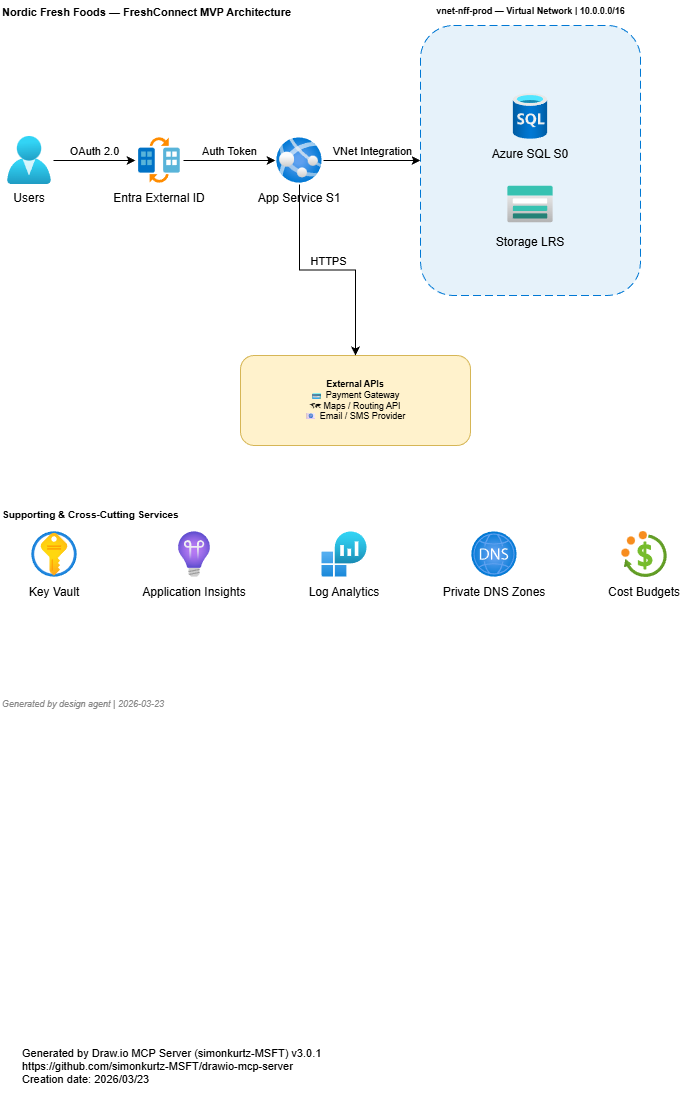
The design pass turns the architecture into visual artifacts and formal design decisions that can be reviewed by humans before coding.
- Architecture diagram
- Architecture decisions
- Cost estimates
Governance
Governance discovery checks what the target subscription will actually allow, so the implementation plan is grounded in policy reality.
- Policy effects
- Required tags
- Deployment blockers
Infra-as-Code Plan
The planner turns the approved architecture into a phased implementation sequence with dependencies, module structure, and deployment ordering.
- Module structure
- Implementation tasks
- Dependency flow
Infra-as-Code Gen
This step shows the AVM-first Bicep output, the resulting module layout, and the validation trail that proves the generated code is viable.
- IaC modules
- Validation results
- Implementation notes
Deployment
The deploy step records what was provisioned, what succeeded, and which post-deployment tasks remain after the infrastructure reaches Azure.
- Preflight checks
- Deployment phases
- Outputs
As-Built Docs
The final delivery package turns the deployed workload into runbooks, architecture documentation, inventories, compliance views, and cost reporting.
- Architecture
- Resources
- Operations
- Compliance
- Cost
Adversarial reviews
The walkthrough closes with the challenge passes that forced corrections across requirements, architecture, planning, and deployment.
- Review findings
- Corrections
- Residual risks
The walkthrough is polished, but the artifacts are still real
The refreshed demo intentionally separates editorial framing from generated content. You get a clearer product experience without losing auditability.
Navigation, layout, scanability, and mobile behavior. The walkthrough now guides readers through the sequence instead of leaving them inside raw markdown snapshots.
The artifact bodies, the validation trail, and the adversarial review evidence. The chrome is editorial; the underlying outputs remain the same generated material.