
Agent and Skill Workflow

Agent and Skill Workflow
Section titled “Agent and Skill Workflow”The multi-step platform engineering workflow.
Overview
Section titled “Overview”APEX uses a multi-agent orchestration system where specialized AI agents coordinate through artifact handoffs to transform Azure project requirements into deployed infrastructure code. The system supports dual IaC tracks — Bicep and Terraform — sharing common requirements, architecture, design, and governance steps (1-3.5) then diverging into track-specific planning, code generation, and deployment (steps 4-6) before converging again for documentation (step 7).
The Orchestrator (🧠 Orchestrator)
orchestrates the complete workflow, routing to
Bicep or Terraform agents based on the iac_tool field in 01-requirements.md,
while enforcing mandatory approval gates.
Formalized Workflow Engine
Section titled “Formalized Workflow Engine”A machine-readable DAG (Directed Acyclic Graph) in
.github/skills/workflow-engine/templates/workflow-graph.json encodes the workflow.
The Orchestrator reads this graph instead of relying on hardcoded step logic:
- Nodes: agent-step, gate, subagent-fan-out, validation
- Edges: dependency links with conditions (
on_complete,on_skip,on_fail) - IaC routing: conditional edges route to Bicep or Terraform agents based on
decisions.iac_tool - Fan-out: Step 7 substeps (cost estimate, runbook, etc.) can execute in parallel
The Orchestrator resolves agent paths and models via tools/registry/agent-registry.json.
Fast-Path Variant
Section titled “Fast-Path Variant”For simple projects (≤3 resources, single environment, no custom policies), the 01-Orchestrator (Fast Path) combines Plan and Code into a single step with 1-pass review. Before skipping governance discovery, it validates the subscription has no Deny-effect policies via Azure CLI. If Deny policies are found, it falls back to the full Orchestrator automatically.
Agent Architecture
Section titled “Agent Architecture”The Orchestrator Pattern
Section titled “The Orchestrator Pattern”The Orchestrator orchestrates the entire workflow by delegating to specialised agents step by step, enforcing approval gates, and maintaining session state. The following diagram shows the end-to-end flow:
sequenceDiagram
    autonumber
    participant U as 👤 User
    participant C as 🧠 Orchestrator Agent
    participant Agents as 🤖 Agents
    participant X as ⚔️ Challenger Agent

    Note over C: AI prepares · Humans decide

    U->>C: Describe infrastructure intent
    C->>Agents: 📋 Gather requirements
    Agents-->>C: 01-requirements.md
    C->>X: Challenge requirements
    X-->>C: Findings
    C->>U: Present for review

    rect rgba(255, 200, 0, 0.15)
    Note over U,C: 🛑 APPROVAL GATE
    U-->>C: ✅ Approve
    end

    C->>Agents: 🏛️ Architecture + 💰 Cost
    Agents-->>C: 02-assessment.md
    C->>X: Challenge architecture
    C->>U: Present for review

    rect rgba(255, 200, 0, 0.15)
    Note over U,C: 🛑 APPROVAL GATE
    U-->>C: ✅ Approve
    end

    C->>Agents: 📐 IaC Plan + Governance
    Note right of Agents: Bicep or Terraform track
    Agents-->>C: 04-plan.md + constraints
    C->>X: Challenge plan
    C->>U: Present for review

    rect rgba(255, 200, 0, 0.15)
    Note over U,C: 🛑 APPROVAL GATE
    U-->>C: ✅ Approve
    end

    C->>Agents: ⚒️ Generate IaC (AVM-first)
    Note right of Agents: lint → review → validate
    Agents-->>C: infra/{bicep,terraform}/{project}

    rect rgba(255, 200, 0, 0.15)
    Note over U,C: 🛑 APPROVAL GATE
    U-->>C: ✅ Approve for deploy
    end

    C->>Agents: 🚀 Deploy to Azure
    Note right of Agents: what-if / plan preview first
    Agents-->>C: 06-deployment-summary.md

    rect rgba(255, 200, 0, 0.15)
    Note over U,C: 🛑 VERIFICATION
    U-->>C: ✅ Verify resources
    end

    C->>Agents: 📚 Generate as-built docs
    Agents-->>C: 07-*.md documentation suite
    C->>U: Present complete documentation

    Note over U,Agents: ✅ AI Orchestrated · Human Governed · Azure Ready
Agent Delegation Graph
Section titled “Agent Delegation Graph”The Orchestrator delegates work to specialised agents in sequence. Shared steps (1–3.5, 7) are common; steps 4–6 diverge into Bicep or Terraform tracks. Code agents invoke validation subagents, and deploy agents invoke the track-specific preview subagents before any Azure changes are applied.
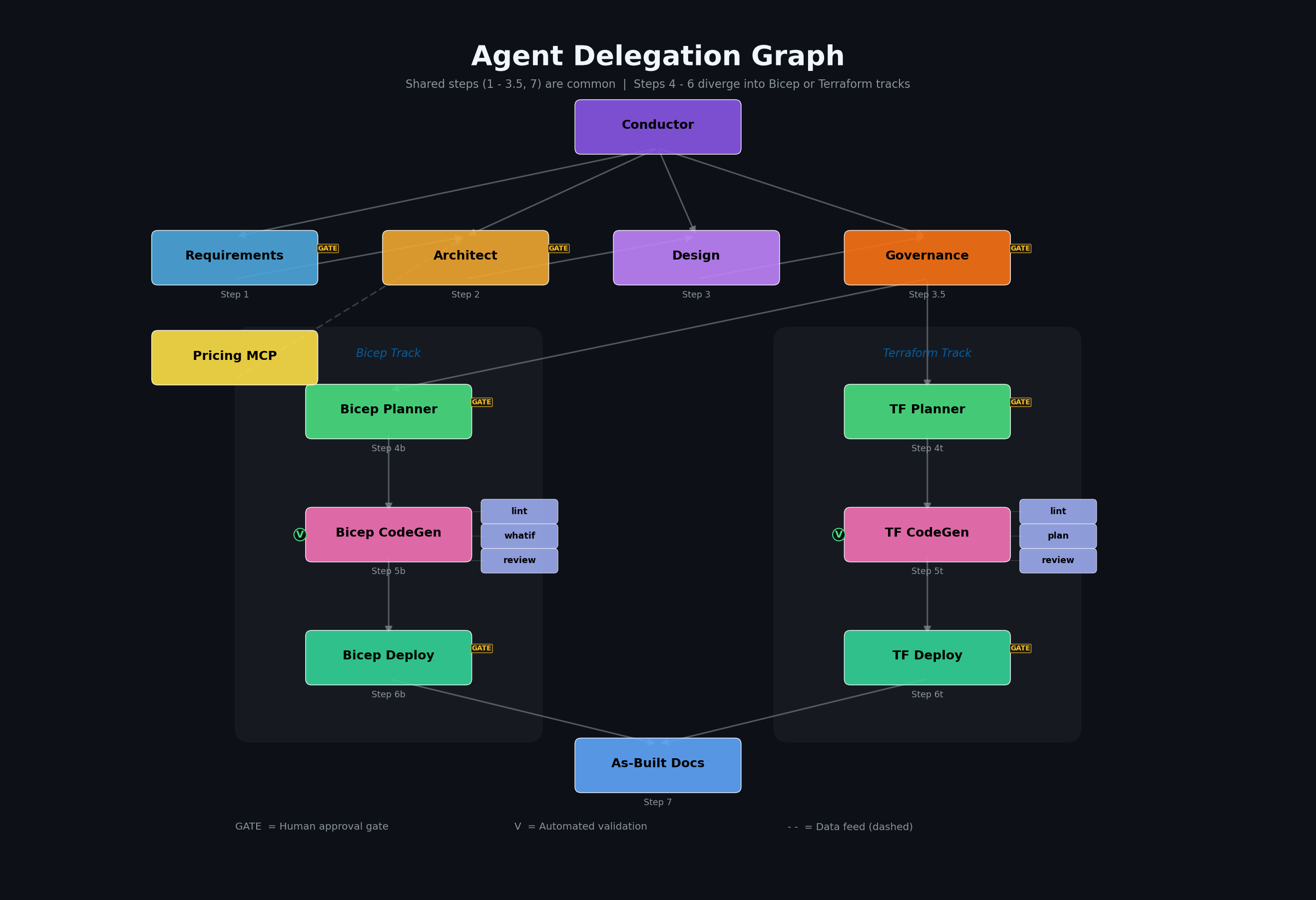
Agent Roster
Section titled “Agent Roster”Primary Orchestrator
Section titled “Primary Orchestrator”| Agent | Codename | Role | Model |
|---|---|---|---|
| Orchestrator | 🧠 Orchestrator | Master orchestrator for multi-step workflow | GPT-5.5 |
Core Agents (by Workflow Step)
Section titled “Core Agents (by Workflow Step)”Steps 1-3.5 and 7 are shared. Steps 4-6 have Bicep and Terraform variants.
| Step | Agent | Codename | Role | Artifact |
|---|---|---|---|---|
| 1 | requirements | 📜 Scribe | Captures project requirements | 01-requirements.md |
| 2 | architect | 🏛️ Oracle | WAF assessment and design decisions | 02-architecture-assessment.md |
| 3 | design | 🎨 Artisan | Diagrams and ADRs | 03-des-*.{drawio,py,png,md} |
| 3.5 | governance | 🛡️ Warden | Policy discovery and compliance | 04-governance-constraints.md/.json |
| 4b | iac-planner | 📐 Strategist | Bicep implementation planning | 04-implementation-plan.md + 04-*-diagram.py/.png |
| 4t | iac-planner | 📐 Strategist | Terraform implementation planning | 04-implementation-plan.md + 04-*-diagram.py/.png |
| 5b | bicep-code | ⚒️ Forge | Bicep template generation | infra/bicep/{project}/ |
| 5t | terraform-code | ⚒️ Forge | Terraform configuration generation | infra/terraform/{project}/ |
| 6b | bicep-deploy | 🚀 Envoy | Bicep deployment | 06-deployment-summary.md |
| 6t | terraform-deploy | 🚀 Envoy | Terraform deployment | 06-deployment-summary.md |
| 7 | as-built | 📚 Chronicler | Post-deployment documentation suite | 07-*.md |
Validation Subagents
Section titled “Validation Subagents”Bicep track:
| Subagent | Purpose | Invoked By |
|---|---|---|
bicep-validate-subagent | Lint + code review (AVM, security, naming) | bicep-code |
bicep-whatif-subagent | Deployment preview (az deployment what-if) | bicep-deploy |
Terraform track:
| Subagent | Purpose | Invoked By |
|---|---|---|
terraform-validate-subagent | Lint + code review (AVM-TF, security, naming) | terraform-code |
terraform-plan-subagent | Deployment preview (terraform plan) | terraform-deploy |
Standalone Agents
Section titled “Standalone Agents”| Agent | Codename | Role |
|---|---|---|
challenger | ⚔️ Challenger | Adversarial reviewer — challenges architecture, plans, and code |
diagnose | 🔍 Sentinel | Resource health assessment and troubleshooting |
Approval Gates
Section titled “Approval Gates”The Orchestrator enforces mandatory pause points for human oversight:
| Gate | After Step | User Action |
|---|---|---|
| Gate 1 | Requirements (Step 1) | Confirm requirements complete |
| Gate 2 | Architecture (Step 2) | Approve WAF assessment |
| Gate 2.5 | Governance (Step 3.5) | Approve governance constraints |
| Gate 3 | Planning (Step 4) | Approve implementation plan |
| Gate 4 | Pre-Deploy (Step 5) | Approve lint/what-if/review results |
| Gate 5 | Post-Deploy (Step 6) | Verify deployment |
Workflow Steps
Section titled “Workflow Steps”Step 1: Requirements (📜 Scribe)
Section titled “Step 1: Requirements (📜 Scribe)”Agent: requirements
Gather project requirements through interactive conversation.
Invoke: Ctrl+Shift+A → requirementsOutput: agent-output/{project}/01-requirements.mdCaptures:
- Functional requirements (what the system does)
- Non-functional requirements (performance, availability, security)
- Compliance requirements (regulatory, organizational)
- Budget constraints
Handoff: Passes context to architect agent.
Step 2: Architecture (🏛️ Oracle)
Section titled “Step 2: Architecture (🏛️ Oracle)”Agent: architect
Evaluate requirements against Azure Well-Architected Framework pillars.
Invoke: Ctrl+Shift+A → architectOutput: agent-output/{project}/02-architecture-assessment.mdFeatures:
- WAF pillar scoring (Reliability, Security, Cost, Operations, Performance)
- SKU recommendations with real-time pricing (via Azure Pricing MCP)
- Architecture decisions with rationale
- Risk identification and mitigation
Handoff: Suggests drawio skill or IaC planning agent (iac-planner).
Step 3: Design Artifacts (🎨 Artisan | Optional)
Section titled “Step 3: Design Artifacts (🎨 Artisan | Optional)”Skills: drawio, python-diagrams, azure-adr
Create visual and textual design documentation.
Trigger: "Create an architecture diagram for {project}"Output: agent-output/{project}/03-des-diagram.drawio, 03-des-adr-*.mdDiagram types: Azure architecture, business flows, ERD, timelines
ADR content: Decision, context, alternatives, consequences
Step 3.5: Governance (🛡️ Warden)
Section titled “Step 3.5: Governance (🛡️ Warden)”Agent: governance (04g-Governance)
Discover Azure Policy constraints and produce governance artifacts.
Invoke: Ctrl+Shift+A → governanceOutput: agent-output/{project}/04-governance-constraints.md, 04-governance-constraints.jsonFeatures:
- Azure Policy REST API discovery via the governance agent
- Policy effect classification (Deny, Audit, Modify, DeployIfNotExists)
- Dual-track property mapping (
bicepPropertyPath+azurePropertyPath)
Step 4: Planning (📐 Strategist)
Section titled “Step 4: Planning (📐 Strategist)”Agent: iac-planner
Create detailed implementation plan using governance constraints as input.
The planner validates governance completeness before proceeding: the
04-governance-constraints.json file must exist, be valid JSON, have
discovery_status: "COMPLETE", and contain a policy array. If any check
fails, the planner stops and requests governance refresh.
=== “Bicep”
```textInvoke: Ctrl+Shift+A → iac-plannerOutput: agent-output/{project}/04-implementation-plan.md```=== “Terraform”
```textInvoke: Ctrl+Shift+A → iac-plannerOutput: agent-output/{project}/04-implementation-plan.md```Prerequisites: 04-governance-constraints.md/.json from Step 3.5
If governance discovery completed successfully, an empty policy array is still a valid input. It means no deny-effect constraints were found for the current scope.
Features:
- Governance constraints integration from Step 3.5
- AVM module selection (Bicep:
br/public:avm/res/, Terraform: AVM-TF registry) - Resource dependency mapping
- Auto-generated Step 4 diagrams (
04-dependency-diagram.py/.pngand04-runtime-diagram.py/.png) - Naming convention validation (CAF)
- Phased implementation approach
Step 5: Implementation (⚒️ Forge)
Section titled “Step 5: Implementation (⚒️ Forge)”Agent: bicep-code (Bicep track) or terraform-code (Terraform track)
Generate IaC templates following Azure Verified Modules standards.
=== “Bicep”
```textInvoke: Ctrl+Shift+A → bicep-codeOutput: infra/bicep/{project}/main.bicep, modules/```=== “Terraform”
```textInvoke: Ctrl+Shift+A → terraform-codeOutput: infra/terraform/{project}/main.tf, modules/```Both tracks also produce agent-output/{project}/05-implementation-reference.md.
Standards (shared across both tracks):
- AVM-first approach (Bicep: public registry; Terraform: AVM-TF registry)
- Unique suffix for global resource names
- Required tags on all resources
- Security defaults (TLS 1.2, HTTPS-only, managed identity)
- Phase 1.5 governance compliance mapping from
04-governance-constraints.json
Preflight Validation (via track-specific subagents):
| Bicep Subagent | Terraform Subagent | Validation |
|---|---|---|
bicep-validate-subagent | terraform-validate-subagent | Lint + code review |
Step 6: Deployment (🚀 Envoy)
Section titled “Step 6: Deployment (🚀 Envoy)”Agent: bicep-deploy (Bicep track) or terraform-deploy (Terraform track)
Execute Azure deployment with preflight validation.
The deploy agents always run a preview before applying changes:
- Bicep uses
bicep-whatif-subagentforaz deployment group what-if - Terraform uses
terraform-plan-subagentforterraform plan
=== “Bicep”
```textInvoke: Ctrl+Shift+A → bicep-deployOutput: agent-output/{project}/06-deployment-summary.md```
**Bicep features**: `bicep build` validation, `az deployment group what-if` analysis,deployment execution via `azd provision`, post-deployment resource verification.
=== “Terraform”
```textInvoke: Ctrl+Shift+A → terraform-deployOutput: agent-output/{project}/06-deployment-summary.md```
**Terraform features**: `terraform validate` and `terraform fmt -check`,`terraform plan` preview, phase-aware deployment via `bootstrap.sh` and `deploy.sh`,post-deployment resource verification.Step 7: Documentation (📚 Chronicler)
Section titled “Step 7: Documentation (📚 Chronicler)”Agent: as-built
Generate comprehensive workload documentation after deployment verification.
Invoke: Ctrl+Shift+A → as-builtOutput: agent-output/{project}/07-*.mdThe As-Built agent uses the azure-artifacts skill and prior workflow artifacts
to assemble the final documentation suite.
Document Suite:
| File | Purpose |
|---|---|
07-documentation-index.md | Master index with links |
07-design-document.md | Technical design documentation |
07-operations-runbook.md | Day-2 operational procedures |
07-resource-inventory.md | Complete resource listing |
07-ab-cost-estimate.md | As-built cost analysis |
07-compliance-matrix.md | Security control mapping |
07-backup-dr-plan.md | Disaster recovery procedures |
Complexity Classification
Section titled “Complexity Classification”The Requirements agent classifies project complexity based on scope. The Orchestrator validates the classification. Complexity drives the number of adversarial review passes at Steps 1, 2, 4, and 5.
| Tier | Criteria |
|---|---|
| Simple | ≤3 resource types, single region, no custom Azure Policy, single environment |
| Standard | 4–8 resource types, multi-region OR multi-env (not both), ≤3 custom policies |
| Complex | >8 resource types, multi-region + multi-env, >3 custom policies, hub-spoke |
Adversarial Review Matrix
Section titled “Adversarial Review Matrix”Reviews target AI-generated creative decisions (architecture, plan, code) — not machine-discovered data (governance) or Azure tool output (what-if).
| Complexity | Step 1 (Req) | Step 2 (Arch) | Step 4 (Plan) | Step 5 (Code) |
|---|---|---|---|---|
| simple | 1× | 1× + 1 cost | 1× | 1× |
| standard | 1× | 2× (→3×) + 1 cost | 2× | 2× (→3×) |
| complex | 1× | 3× + 1 cost | 2× | 3× |
Conditional passes: ”(→3×)” means pass 3 only runs if pass 2 returned ≥1
must_fix. Plan reviews are capped at 2 passes because the cost-feasibility lens was already applied at Step 2. ”+ 1 cost” is a dedicated cost-estimate challenger pass that always runs in parallel with architecture pass 1 (independent artifact).Steps without review: Design (3), Deploy (6), As-Built (7). Deploy previews are validated by Azure tooling; the human approves at each gate. Governance (3.5) now has 1 comprehensive challenger pass.
Agents vs Skills
Section titled “Agents vs Skills”| Aspect | Agents | Skills |
|---|---|---|
| Invocation | Manual (Ctrl+Shift+A) or via Orchestrator | Automatic or explicit |
| Interaction | Conversational with handoffs | Task-focused |
| State | Session context | Stateless |
| Output | Multiple artifacts | Specific outputs |
| When to use | Core workflow steps | Specialized capabilities |
Quick Reference
Section titled “Quick Reference”Using the Orchestrator (Recommended)
Section titled “Using the Orchestrator (Recommended)”1. Ctrl+Shift+I → Select "Orchestrator"2. Describe your platform engineering project3. Follow guided workflow through all steps with approval gatesDirect Agent Invocation
Section titled “Direct Agent Invocation”1. Ctrl+Shift+A → Select specific agent2. Provide context for that step3. Agent produces artifacts and suggests next stepSkill Invocation
Section titled “Skill Invocation”Automatic: Skills activate based on prompt keywords:
"Create an architecture diagram" → drawio skill"Document the decision to use AKS" → azure-adr skillExplicit: Reference the skill by name:
"Use the azure-artifacts skill to generate documentation"Artifact Naming Convention
Section titled “Artifact Naming Convention”| Step | Prefix | Example |
|---|---|---|
| Requirements | 01- | 01-requirements.md |
| Architecture | 02- | 02-architecture-assessment.md |
| Design | 03-des- | 03-des-diagram.drawio, 03-des-adr-0001-*.md |
| Planning | 04- | 04-implementation-plan.md, 04-governance-constraints.md |
| Implementation | 05- | 05-implementation-reference.md |
| Deployment | 06- | 06-deployment-summary.md |
| As-Built | 07- | 07-design-document.md, 07-ab-diagram.drawio |
| Diagnostics | 08- | 08-resource-health-report.md |
Next Steps
Section titled “Next Steps”- Quickstart — 10-minute getting started walkthrough