
Implementation Phases
Deployment Phases
Section titled “Deployment Phases”Deployment strategy: Phased — 5 phases with validation gates between each.
Phase 1: Foundation & Monitoring
Section titled “Phase 1: Foundation & Monitoring”| Order | Module | Resources | Validation |
|---|---|---|---|
| 1 | log-analytics.bicep | Log Analytics Workspace | Workspace accessible, data ingesting |
| 2 | app-insights.bicep | Application Insights | Connected to Log Analytics workspace |
Approval Gate: Verify Log Analytics workspace is provisioned and App Insights is linked.
Phase 2: Networking
Section titled “Phase 2: Networking”| Order | Module | Resources | Validation |
|---|---|---|---|
| 3 | virtual-network.bicep | VNet + 2 subnets (app, PE) | VNet provisioned, subnets have correct delegations |
| 4 | private-dns-zones.bicep | 3 Private DNS Zones + VNet links | DNS zones linked to VNet, resolving correctly |
Approval Gate: Verify VNet and subnets are provisioned. Confirm DNS zones are linked.
Phase 3: Security, Data & Images
Section titled “Phase 3: Security, Data & Images”| Order | Module | Resources | Validation |
|---|---|---|---|
| 5 | key-vault.bicep | Key Vault (Standard, RBAC auth) + PE | RBAC enabled, PE active, diagnostic settings on |
| 6 | storage.bicep | Storage Account (LRS GPv2) + 3 tables + PE | HTTPS-only, no public blob, no shared key, PE active |
| 7 | container-registry.bicep | Container Registry (Premium) + PE | Admin disabled, PE active, login server reachable via PE |
Approval Gate: Verify security hardening on KV and Storage. Confirm PEs resolve via private DNS. Confirm ACR accepts image push.
Phase 4: Compute
Section titled “Phase 4: Compute”| Order | Module | Resources | Validation |
|---|---|---|---|
| 8 | app-service-plan.bicep | App Service Plan (S1 Linux) | Plan provisioned, S1 SKU confirmed |
| 9 | web-app.bicep | Web App + MI + VNet integration + staging slot | App deployed, MI has KV/Storage/ACR roles, VNet integrated, default hostname responds |
Approval Gate: Verify Web App is running, managed identity roles are assigned, VNet integration is active, default hostname returns HTTP 200.
Phase 5: Cost Monitoring
Section titled “Phase 5: Cost Monitoring”| Order | Module | Resources | Validation |
|---|---|---|---|
| 10 | budget.bicep | Consumption Budget + 3 alert thresholds | Budget visible in Azure Cost Management |
Approval Gate: Verify budget appears in Azure Cost Management with correct thresholds.
Phase Summary
Section titled “Phase Summary”| Phase | Name | Resources | Est. Deploy Time | Approval Gate |
|---|---|---|---|---|
| 1 | Foundation & Monitoring | 2 | ~3 min | Yes |
| 2 | Networking | 4 | ~3 min | Yes |
| 3 | Security, Data & Images | 3 (+3 PEs) | ~5 min | Yes |
| 4 | Compute | 2 | ~6 min | Yes |
| 5 | Cost Monitoring | 1 | ~1 min | Yes |
| Total | ~12 | ~18 min |
Implementation Tasks
Section titled “Implementation Tasks”The orchestration module (main.bicep) calls all 10 Bicep modules in dependency order:
- log-analytics.bicep — Log Analytics Workspace:
log-malta-catering-dev, Per-GB tier, 30-day retention - app-insights.bicep — Application Insights linked to Log Analytics workspace
- virtual-network.bicep — VNet
10.0.0.0/16withsnet-app(10.0.1.0/24, Web delegation) andsnet-pe(10.0.2.0/24, private endpoints) - private-dns-zones.bicep — 3 DNS zones (
privatelink.vaultcore.azure.net,privatelink.table.core.windows.net,privatelink.azurecr.io) linked to VNet - key-vault.bicep — Key Vault with RBAC auth, purge protection, PE, diagnostics
- storage.bicep — Storage Account (Standard LRS GPv2) with 3 tables (orders, menu, customers), HTTPS-only, no shared key, PE
- container-registry.bicep — Container Registry (Premium) with admin disabled, PE, diagnostics
- app-service-plan.bicep — App Service Plan (S1 Linux, single instance)
- web-app.bicep — Web App with system-assigned MI, VNet integration, staging slot, RBAC roles (KV Secrets User, Storage Table Data Contributor, AcrPull)
- budget.bicep — Consumption Budget with 3 forecast alert thresholds (80%, 100%, 120%)
Dependency Graph Details
Section titled “Dependency Graph Details”The dependency graph shows module-level ordering. Key dependency chains:
- Log Analytics is the root dependency — App Insights, Key Vault, Storage, and ACR all send diagnostics to it
- VNet is required before DNS zones and all private endpoints
- Web App depends on nearly everything: App Service Plan, VNet, ACR, Key Vault, Storage, and App Insights
Runtime Diagram
Section titled “Runtime Diagram”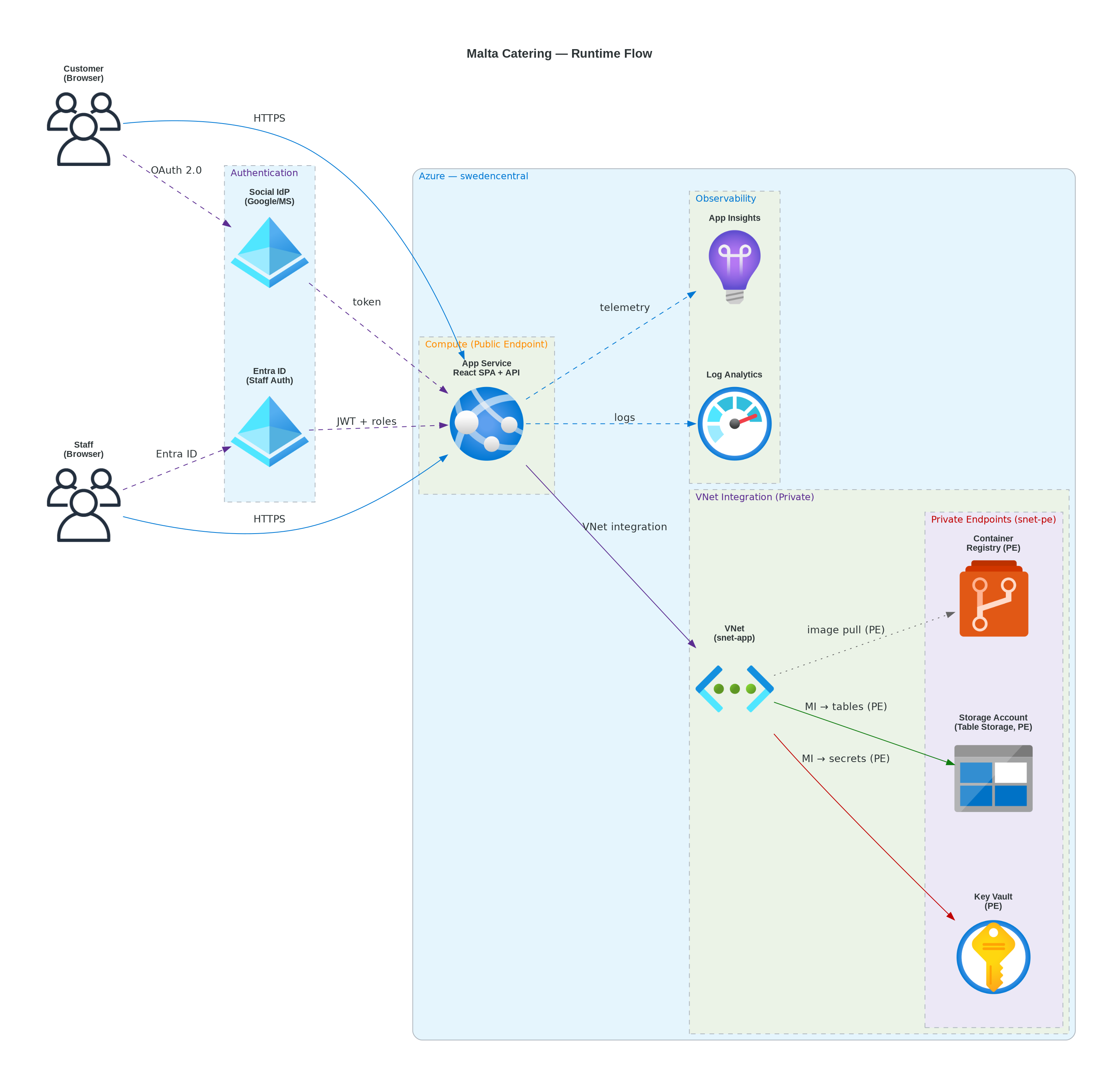
Estimated Implementation Time
Section titled “Estimated Implementation Time”| Task | Estimated Duration |
|---|---|
| Bicep modules (10 modules) | 60 minutes |
| Parameter file + deploy script | 15 minutes |
| Testing (lint + build + what-if) | 15 minutes |
| Deployment (5 phases) | 20 minutes |
| Total | ~110 minutes |