Step-by-Step Walkthrough
This walkthrough takes you from an empty subscription to a fully deployed SMB Ready Foundation environment. Choose the Bicep or Terraform tab for your preferred IaC track.
Prerequisites
Section titled “Prerequisites”Before starting, ensure you have:
- An Azure subscription with Owner role
- Azure CLI 2.60+
- Azure Developer CLI (
azd) 1.9+ - PowerShell 7.4+ (Bicep hooks) or Bash (Terraform hooks)
- The repository cloned locally
Deployment Steps
Section titled “Deployment Steps”-
Set up the management group
Section titled “Set up the management group”The
smb-rfmanagement group is created once per tenant. It hosts the 30 management group-scoped policies.Terminal window az account management-group create --name smb-rf \--display-name "SMB Ready Foundation"az account management-group subscription add --name smb-rf \--subscription $(az account show --query id -o tsv) -
Navigate to the project
Section titled “Navigate to the project”Terminal window cd infra/bicep/smb-ready-foundationTerminal window cd infra/terraform/smb-ready-foundation -
Create an azd environment
Section titled “Create an azd environment”Terminal window azd env new my-customer-prod -
Configure parameters
Section titled “Configure parameters”Set the deployment scenario and required parameters:
Terminal window # Choose scenario: baseline | firewall | vpn | fullazd env set SCENARIO baseline# Requiredazd env set OWNER "partner@contoso.com"# Defaults (override if needed)azd env set AZURE_LOCATION swedencentralazd env set ENVIRONMENT prodazd env set HUB_VNET_ADDRESS_SPACE "10.0.0.0/23"azd env set SPOKE_VNET_ADDRESS_SPACE "10.0.2.0/23"For vpn or full scenarios, also set:
Terminal window azd env set ON_PREMISES_ADDRESS_SPACE "192.168.0.0/16" -
Deploy
Section titled “Deploy”Terminal window azd upThe pre-provision hook (
hooks/pre-provision.ps1) automatically:- Deploys the management group template (
deploy-mg.bicep) - Creates MG-scoped policy assignments
- Validates CIDR ranges for conflicts
- Cleans up stale resources from prior failed runs
Then
azd provisiondeploysmain.bicepat subscription scope.Terminal window azd upThe pre-provision hook (
hooks/pre-provision.sh) automatically:- Bootstraps the Terraform backend (storage account + container)
- Writes
terraform.auto.tfvars.json - Validates CIDRs and required parameters
- Runs
terraform init -reconfigure
Then
azd provisionrunsterraform apply— a single root that composes MG + subscription scopes. - Deploys the management group template (
-
Verify the deployment
Section titled “Verify the deployment”Terminal window # Check resource groups (expect 6)az group list \--query "[?starts_with(name,'rg-')].{Name:name, State:properties.provisioningState}" \-o table# Check MG policy count (expect 33)az policy assignment list \--scope "/providers/Microsoft.Management/managementGroups/smb-rf" \--query "length(@)"# Check budgetaz consumption budget list \--query "[?name=='budget-smb-monthly'].{Name:name, Amount:amount}" -o table -
Review outputs
Section titled “Review outputs”The post-provision hook prints a summary including:
- Resource group names and states
- Hub/spoke VNet addresses
- Key Vault URI
- Log Analytics workspace ID
- Scenario-specific resources (Firewall IP, VPN Gateway status)
Terminal window terraform outputKey outputs:
hub_vnet_id,spoke_vnet_id,key_vault_uri,log_analytics_workspace_id,firewall_private_ip(if deployed).
Scenario Quick Commands
Section titled “Scenario Quick Commands”| Scenario | Command |
|---|---|
| Baseline (~$48/mo) | azd env set SCENARIO baseline && azd up |
| Firewall (~$336/mo) | azd env set SCENARIO firewall && azd up |
| VPN (~$187/mo) | azd env set SCENARIO vpn && azd env set ON_PREMISES_ADDRESS_SPACE "192.168.0.0/16" && azd up |
| Full (~$476/mo) | azd env set SCENARIO full && azd env set ON_PREMISES_ADDRESS_SPACE "192.168.0.0/16" && azd up |
What Gets Deployed
Section titled “What Gets Deployed”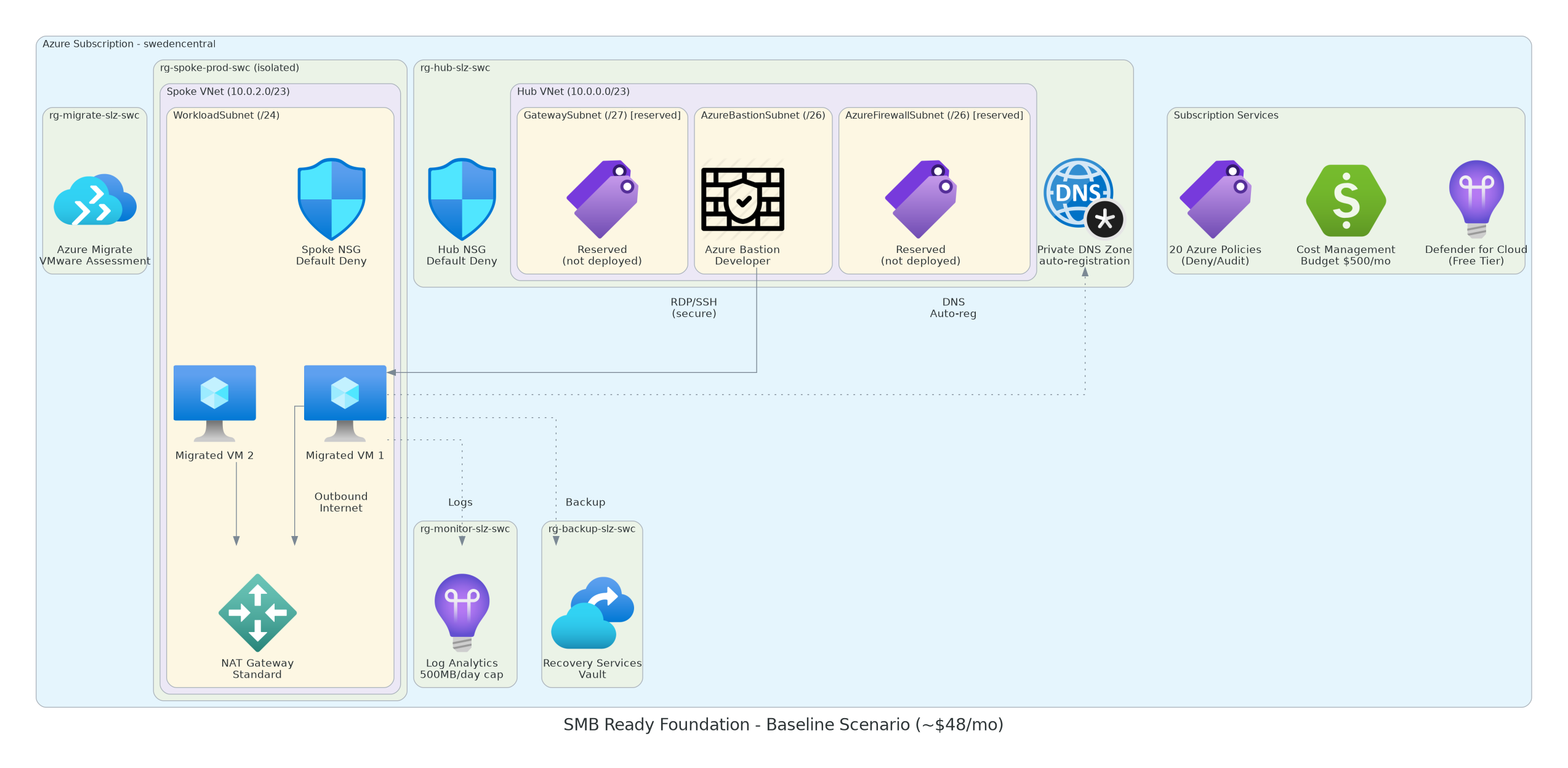
See Deployment Scenarios for the full resource matrix per scenario.
Troubleshooting
Section titled “Troubleshooting”| Problem | Solution |
|---|---|
AnotherOperationInProgress | Wait 5–10 minutes and retry azd up |
| Management group permission denied | Run Setup-ManagementGroupPermissions.ps1 as Global Admin |
| VPN Gateway times out | VPN GW takes 25–40 min; retry usually succeeds |
Firewall InternalServerError | Known race condition — serialized via dependsOn in v0.10.0+ |