
RAG Fundamentals
Vector Embedding Process
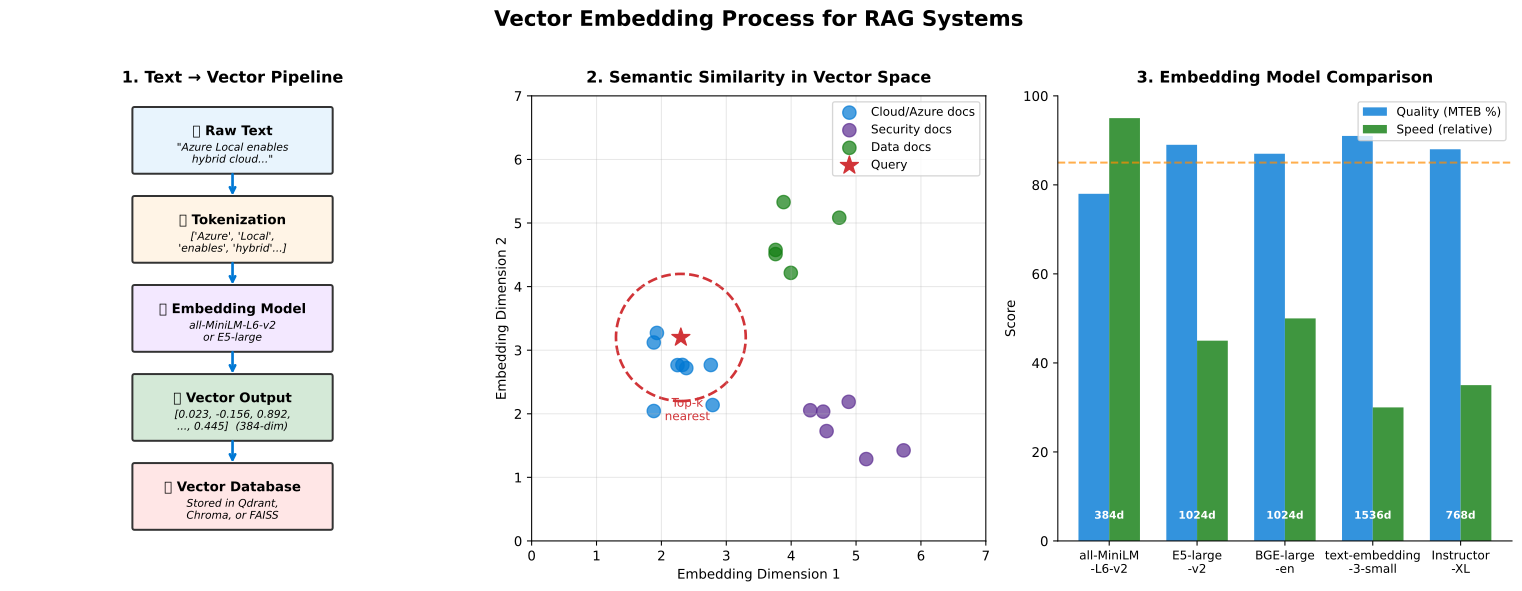 Figure 1: How text is converted to vector embeddings for RAG retrieval
Traditional LLMs and Their Limitations
Section titled “Traditional LLMs and Their Limitations”How LLMs Work
Section titled “How LLMs Work”Large Language Models are neural networks trained on massive text corpora to predict the next word in a sequence.
Training Process:
- Ingest billions of words from internet, books, code
- Learn patterns, grammar, facts, reasoning
- Generate coherent, contextual responses
Strengths:
- General knowledge across many domains
- Strong language understanding
- Creative text generation
- Code generation and explanation
Key Limitations
Section titled “Key Limitations”1. Knowledge Cutoff:
- Training data has a cutoff date (for example, September 2021)
- No awareness of events after training
- Cannot access proprietary organizational data
2. Hallucinations:
- May generate plausible but false information
- Confident incorrect answers
- No way to verify claims without external validation
3. Lack of Source Attribution:
- Cannot cite sources for information
- Difficult to verify accuracy
- No audit trail
4. Static Knowledge:
- Knowledge frozen at training time
- Cannot be easily updated
- Retraining is expensive ($millions)
5. Context Window Limitations:
- Limited context size (4K-32K tokens typical)
- Cannot process entire large documents
- Loses context in long conversations
Information Retrieval Basics
Section titled “Information Retrieval Basics”What is Information Retrieval?
Section titled “What is Information Retrieval?”Process of finding relevant documents from a collection based on a query.
Traditional Search:
- Keyword matching (TF-IDF, BM25)
- Boolean queries (AND, OR, NOT)
- Fast but limited by exact matches
Semantic Search:
- Understanding meaning, not just keywords
- Finds conceptually similar documents
- Better handles synonyms and paraphrasing
Vector Search Fundamentals
Section titled “Vector Search Fundamentals”Core Concept: Represent text as numerical vectors (embeddings) in high-dimensional space. Similar meanings → similar vectors.
Process:
- Convert query to vector
- Find nearest vectors in database
- Return corresponding documents
Advantages:
- Semantic similarity
- Language-independent (with multilingual models)
- Efficient at scale
Embedding Models and Representation Learning
Section titled “Embedding Models and Representation Learning”What Are Embeddings?
Section titled “What Are Embeddings?”Definition: Dense numerical vector representations of text that capture semantic meaning.
Example:
"king" → [0.2, 0.5, -0.1, ..., 0.3] (768 dimensions)"queen" → [0.18, 0.52, -0.09, ..., 0.29] (similar vector!)Key Property: Semantically similar text has similar embeddings.
Popular Embedding Models
Section titled “Popular Embedding Models”OpenAI text-embedding-ada-002:
- 1536 dimensions
- General purpose
- Cloud API
sentence-transformers (Open-Source):
- all-MiniLM-L6-v2: Fast, 384 dimensions
- all-mpnet-base-v2: Better quality, 768 dimensions
- Can run locally
Domain-Specific Models:
- BioBERT for biomedical text
- FinBERT for financial documents
- CodeBERT for source code
Embedding Generation Process
Section titled “Embedding Generation Process”# Example with sentence-transformersfrom sentence_transformers import SentenceTransformer
model = SentenceTransformer('all-MiniLM-L6-v2')
# Generate embeddingstext = "Azure Local provides sovereign cloud capabilities"embedding = model.encode(text)# embedding.shape = (384,)Vector Databases and Similarity Search
Section titled “Vector Databases and Similarity Search”What is a Vector Database?
Section titled “What is a Vector Database?”Specialized database optimized for storing and querying high-dimensional vectors.
Key Capabilities:
- Store millions to billions of vectors
- Fast similarity search (nearest neighbors)
- Metadata filtering
- Hybrid search (vector + keyword)
Popular Vector Databases
Section titled “Popular Vector Databases”Cloud:
- Azure Cognitive Search (with vector support)
- Pinecone
- Weaviate Cloud
Self-Hosted / Edge:
- Chroma
- Milvus
- Qdrant
- FAISS (Facebook AI Similarity Search)
Similarity Metrics
Section titled “Similarity Metrics”Cosine Similarity:
- Measures angle between vectors
- Range: -1 to 1 (higher = more similar)
- Most common for text
Euclidean Distance:
- Straight-line distance
- Lower = more similar
- Sensitive to magnitude
Dot Product:
- Inner product of vectors
- Higher = more similar
- Fast to compute
Search Algorithms
Section titled “Search Algorithms”Exact Search:
- Brute force comparison
- 100% accurate
- Slow for large datasets (O(n))
Approximate Nearest Neighbor (ANN):
- Trade accuracy for speed
- 95-99% recall typical
- Much faster (sub-linear time)
- Algorithms: HNSW, IVF, LSH
Fine-Tuning vs. RAG Trade-Offs
Section titled “Fine-Tuning vs. RAG Trade-Offs”graph TB
Decision{Knowledge Update<br/>Approach?}
Decision -->|Style/Behavior| FT[Fine-Tuning]
Decision -->|Factual Knowledge| RAG[RAG System]
Decision -->|Both| Hybrid[Hybrid Approach]
FT --> FTPros[Pros:<br/>• Deep domain learning<br/>• No retrieval latency<br/>• Behavior changes]
FT --> FTCons[Cons:<br/>• Expensive<br/>• Stale knowledge<br/>• Large data needed]
RAG --> RAGPros[Pros:<br/>• No retraining<br/>• Easy updates<br/>• Citations<br/>• Cost-effective]
RAG --> RAGCons[Cons:<br/>• Retrieval latency<br/>• Context limits<br/>• Quality critical]
Hybrid --> HybridDesc[Combine:<br/>1. Fine-tune for style<br/>2. RAG for facts<br/>Best of both worlds]
style Decision fill:#0078D4,stroke:#004578,stroke-width:3px,color:#fff
style FT fill:#FFF4E6,stroke:#FF8C00,stroke-width:2px,color:#000
style RAG fill:#E8F4FD,stroke:#0078D4,stroke-width:2px,color:#000
style Hybrid fill:#D4E9D7,stroke:#107C10,stroke-width:2px,color:#000
Fine-Tuning
Section titled “Fine-Tuning”What It Is: Further training an LLM on domain-specific data.
Pros:
- Model learns domain knowledge deeply
- No retrieval latency
- Can change model behavior/style
Cons:
- Expensive (compute, time, expertise)
- Risk of catastrophic forgetting
- Knowledge becomes stale
- Requires significant data (1000s+ examples)
Best For:
- Changing model style/tone
- Learning specialized vocabulary
- Task-specific optimization
RAG (Retrieval-Augmented Generation)
Section titled “RAG (Retrieval-Augmented Generation)”What It Is: Retrieve relevant documents and provide as context to LLM.
Pros:
- No model retraining needed
- Easy to update knowledge (just add documents)
- Grounded responses with citations
- Cost-effective
- Transparent and auditable
Cons:
- Retrieval latency added
- Limited by context window
- Retrieval quality critical
Best For:
- Factual question answering
- Knowledge-intensive tasks
- Frequently changing information
- Providing citations
Hybrid Approach
Section titled “Hybrid Approach”Combine Both:
- Fine-tune LLM on domain for style and vocabulary
- Use RAG for up-to-date factual information
Example: Fine-tune on medical language, retrieve latest research papers.
Evaluation Metrics for RAG Systems
Section titled “Evaluation Metrics for RAG Systems”Retrieval Metrics
Section titled “Retrieval Metrics”Precision:
- Of retrieved documents, how many are relevant?
- Precision = Relevant Retrieved / Total Retrieved
Recall:
- Of all relevant documents, how many were retrieved?
- Recall = Relevant Retrieved / Total Relevant
F1 Score:
- Harmonic mean of precision and recall
- F1 = 2 × (Precision × Recall) / (Precision + Recall)
Mean Reciprocal Rank (MRR):
- How high is the first relevant result?
- MRR = 1 / rank_of_first_relevant_document
Generation Metrics
Section titled “Generation Metrics”Faithfulness:
- Is the generated answer supported by retrieved documents?
- Manually evaluated or with LLM-as-judge
Answer Relevance:
- Does the answer address the question?
Groundedness:
- Is every claim in the answer backed by sources?
BLEU / ROUGE (for reference answers):
- Compare generated answer to gold standard
- Measures n-gram overlap
End-to-End Metrics
Section titled “End-to-End Metrics”Answer Accuracy:
- Is the final answer factually correct?
- Requires gold standard QA pairs
Latency:
- Time from query to answer
- Target: < 2-5 seconds for good UX
Cost:
- Per-query cost (LLM API, compute)
- Important for ROI calculations
RAG Components and Data Flow
Section titled “RAG Components and Data Flow”Practical RAG Components and Tools
Section titled “Practical RAG Components and Tools”RAG Framework Comparison
Section titled “RAG Framework Comparison”LangChain:
- Most popular RAG framework
- Python and JavaScript
- Extensive integrations
- Modular and flexible
LlamaIndex (GPT Index):
- Specialized for RAG
- Better for complex queries
- Strong data connectors
- Query optimization built-in
Haystack:
- Production-ready
- Good for Q&A systems
- Pipeline architecture
- Open-source
Complete RAG Stack Example
Section titled “Complete RAG Stack Example”Document Processing:
- Unstructured.io for document parsing
- LangChain document loaders
Embedding:
- Sentence-Transformers (local)
- OpenAI embeddings (cloud)
Vector Database:
- Chroma (local, simple)
- Milvus (production, scalable)
LLM:
- LLaMA 2 (open-source, local)
- GPT-4 (cloud, highest quality)
Framework:
- LangChain for orchestration
Minimal RAG Implementation
Section titled “Minimal RAG Implementation”from langchain.document_loaders import DirectoryLoaderfrom langchain.text_splitter import RecursiveCharacterTextSplitterfrom langchain.embeddings import HuggingFaceEmbeddingsfrom langchain.vectorstores import Chromafrom langchain.llms import LlamaCppfrom langchain.chains import RetrievalQA
# 1. Load documentsloader = DirectoryLoader('./documents')documents = loader.load()
# 2. Split into chunkstext_splitter = RecursiveCharacterTextSplitter(chunk_size=1000, chunk_overlap=100)texts = text_splitter.split_documents(documents)
# 3. Create embeddingsembeddings = HuggingFaceEmbeddings()
# 4. Store in vector databasevectorstore = Chroma.from_documents(texts, embeddings)
# 5. Create retrieverretriever = vectorstore.as_retriever()
# 6. Load LLMllm = LlamaCpp(model_path="./llama-2-7b.gguf")
# 7. Create RAG chainqa_chain = RetrievalQA.from_chain_type(llm=llm, retriever=retriever)
# 8. Queryanswer = qa_chain.run("What are the benefits of Azure Local?")print(answer)Best Practices
Section titled “Best Practices”1. Chunk Sizing:
- Balance between too small (loss of context) and too large (irrelevant content)
- Typical: 500-1000 tokens
- Use overlap (100-200 tokens) to preserve context
2. Metadata Filtering:
- Add metadata to documents (date, author, category)
- Enable filtered retrieval
- Improves precision
3. Hybrid Search:
- Combine vector similarity with keyword matching
- Best of both worlds
- More robust
4. Reranking:
- Initial retrieval: top 20-50 results
- Rerank with more sophisticated model
- Return top 3-5 to LLM
5. Prompt Engineering:
- Clear instructions to LLM
- Ask for citations
- Specify answer format
Next Steps
Section titled “Next Steps”Last Updated: October 2025