
Enterprise Patterns
Overview
Section titled “Overview”Enterprise Arc Topology
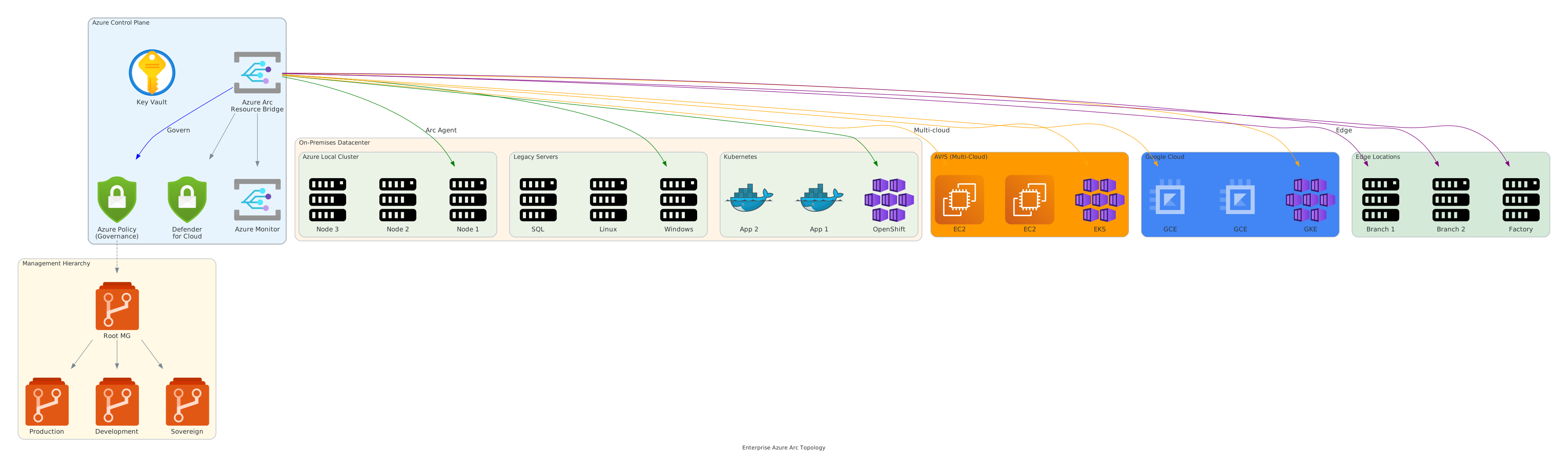 Figure 1: Enterprise Azure Arc hub-spoke governance topology
Large enterprises require proven patterns for deploying Azure Arc at scale while maintaining security, compliance, cost control, and operational excellence. This page covers the most successful enterprise governance models and their applications.
Hub-and-Spoke Governance Model
Section titled “Hub-and-Spoke Governance Model”The hub-and-spoke pattern is the most common enterprise governance model.
Architecture
Section titled “Architecture” ┌─────────────────┐ │ Hub │ │ Management Group │ │ & Policies │ └────────┬─────────┘ │ ┌────────────────────┼────────────────────┐ │ │ │ ┌────▼──────┐ ┌──────▼──────┐ ┌──────▼──────┐ │ Spoke 1 │ │ Spoke 2 │ │ Spoke 3 │ │ Division A │ │ Division B │ │ Division C │ │ 300 Arcs │ │ 200 Arcs │ │ 500 Arcs │ └────────────┘ └──────────────┘ └─────────────┘Governance Flow
Section titled “Governance Flow”-
Central Hub - Enterprise sets baseline policies
- All Arc resources must have monitoring
- Encryption enforcement
- Tagging standards
- Security baseline
-
Spoke Inheritance - Each division inherits hub policies
- Policies automatically applied
- Compliance enforced centrally
- Reporting unified
-
Spoke Override - Divisions override policies as needed
- Request exception for specific requirements
- Approval workflow
- Audit trail maintained
Hub-and-Spoke Implementation
Section titled “Hub-and-Spoke Implementation”# Create hub-and-spoke structure$structure = @{ RootManagementGroup = "Contoso-Enterprise"
# Hub with baseline policies Hub = @{ Name = "Hub-Central-Governance" Policies = @( "Enforce-Monitoring", "Enforce-Encryption", "Enforce-Tagging", "Enforce-TLS-1.2" ) Scope = "All Hub child groups" }
# Spokes inherit hub policies Spokes = @( @{ Name = "Sales-Division" Parent = "Hub-Central-Governance" Policies = "Inherit all" # + Sales-specific policies }, @{ Name = "Engineering-Division" Parent = "Hub-Central-Governance" Policies = "Inherit all" # + Engineering-specific policies }, @{ Name = "Finance-Division" Parent = "Hub-Central-Governance" Policies = "Inherit all" # + Compliance-specific policies } )}Benefits
Section titled “Benefits”- ✅ Consistency - Baseline policies enforced everywhere
- ✅ Flexibility - Divisions customize as needed
- ✅ Scalability - Add new divisions easily
- ✅ Governance - Central visibility and control
- ✅ Cost - Unified billing, but per-division breakdown
Best For
Section titled “Best For”- Multi-division enterprises
- Federated organizational structure
- Mix of centralized and decentralized decision-making
- Organizations with compliance requirements
Multi-Cloud Federation Pattern
Section titled “Multi-Cloud Federation Pattern”Manage Arc resources across multiple cloud providers with unified governance.
Architecture
Section titled “Architecture”┌────────────────────────────────────────────────────┐│ Federation Control Plane ││ • Unified Policy Evaluation ││ • Centralized Compliance Reporting ││ • Cost Analysis across clouds ││ • Security Posture Management │└──────────────┬──────────────────────────────────┬─┘ │ │ ┌──────▼────────┐ ┌─────────▼──────┐ │ Azure Region A │ │ AWS Region │ │ Arc Servers:30 │ │ Arc Servers:40 │ │ Arc K8s: 5 │ │ Arc K8s: 8 │ └────────────────┘ └────────────────┘ │ │ ┌──────▼──────┐ ┌──────────▼──────┐ │ Azure Region│ │ GCP Region │ │ Arc Servers:│ │ Arc Servers:50 │ │ Arc Data:10 │ │ Arc K8s: 10 │ └─────────────┘ └─────────────────┘
Federation Features:├─ Single policy evaluation across all clouds├─ Unified monitoring and alerting├─ Consolidated cost tracking├─ Federated identity (single sign-on)└─ Coordinated disaster recoveryFederation Implementation
Section titled “Federation Implementation”# Define federated policy applied across clouds$federatedPolicy = @{ Name = "Enterprise-Security-Baseline" AppliesTo = @("Azure", "AWS", "GCP", "On-Premises")
PolicyRules = @( @{ Rule = "Mandatory-Encryption" Clouds = "All" Effect = "Deny non-encrypted resources" }, @{ Rule = "Mandatory-Tagging" Clouds = "All" Tags = @("Owner", "CostCenter", "Environment") }, @{ Rule = "Mandatory-Monitoring" Clouds = "All" Target = "Centralized Log Analytics" }, @{ Rule = "Compliant-Regions" Clouds = "AWS/GCP" Regions = @("us-east-1", "eu-west-1", "asia-southeast-1") } )
ComplianceReporting = @{ Frequency = "Daily" Scope = "All 4 clouds" Dashboard = "Enterprise-Federated-Compliance" }}Federation Benefits
Section titled “Federation Benefits”- ✅ Unified Governance - Same policies across all clouds
- ✅ Avoid Vendor Lock-in - Manage multi-cloud as single unit
- ✅ Cost Optimization - Unified cost visibility and allocation
- ✅ Disaster Recovery - Coordinated DR across clouds
- ✅ Operational Excellence - Single team, single processes
Best For
Section titled “Best For”- Multi-cloud enterprises
- Organizations committed to avoiding vendor lock-in
- Workloads that span multiple cloud providers
- Industries with specific cloud requirements (defense, healthcare)
Zero-Trust Security Architecture
Section titled “Zero-Trust Security Architecture”Implement zero-trust principles: “Never trust, always verify”
Zero-Trust Principles for Arc
Section titled “Zero-Trust Principles for Arc”Traditional Security:Perimeter-based trust├─ If you're inside network → trusted├─ If you're outside network → untrusted└─ Flat network = lateral movement risk
Zero-Trust Security:Identity-based trust├─ Every request evaluated individually├─ Every identity verified├─ Every action logged and monitored└─ Least privilege always enforcedZero-Trust Implementation Layers
Section titled “Zero-Trust Implementation Layers”1. Identity Verification
Section titled “1. Identity Verification”# All Arc resource access requires identity verification$identityVerification = @{ AuthenticationMethod = @( "Service Principal with certificate", "Managed Identity", "Multi-Factor Authentication" )
RenewalRequirements = @( "Certificates: Rotate every 90 days", "Tokens: Expire every 1 hour", "Credentials: MFA required every session" )}2. Access Control (RBAC)
Section titled “2. Access Control (RBAC)”Role-Based Access Control:├─ Arc Reader: View resources only├─ Arc Operator: Deploy/update/manage├─ Arc Administrator: Full control├─ Scope: Limited to necessary resources
Example:├─ Developers: Arc Operator on Dev Arc resources├─ Operations: Arc Operator on Prod Arc resources├─ Security Team: Arc Reader on all Arc resources3. Network Security
Section titled “3. Network Security”Network Zero-Trust:├─ Private Endpoints: Secure connectivity to Azure├─ Network Security Groups: Restrict traffic├─ Azure Firewall: Centralized egress control├─ VPN/ExpressRoute: Encrypt all connectivity├─ No public IPs: All Arc management private
Example NSG Rules:├─ Allow Arc API: 443/TCP from private subnet only├─ Deny HTTP: All 80/TCP traffic├─ Allow monitoring egress: Private endpoint only└─ Deny all by default, allow specific4. Data Protection
Section titled “4. Data Protection”Data Protection Controls:├─ Encryption at Rest: Mandatory AES-256├─ Encryption in Transit: TLS 1.2 minimum├─ Key Management: Azure Key Vault integration├─ Secret Rotation: Automatic every 90 days
Certificate Pinning Example:├─ Arc Agent validates Azure endpoint certificate├─ Prevents Man-in-the-Middle attacks├─ Certificate renewal automatic5. Threat Detection & Response
Section titled “5. Threat Detection & Response”Continuous Threat Detection:├─ Monitor: All Arc resource access├─ Detect: Anomalous behavior patterns├─ Alert: Real-time security alerts├─ Respond: Automated incident response
Alert Examples:├─ Multiple failed auth attempts → Lock account├─ Bulk resource deletion → Trigger approval├─ Off-hours access → Require MFA re-auth├─ Unexpected region access → Block + alertZero-Trust Architecture Diagram
Section titled “Zero-Trust Architecture Diagram”Arc Resource Request │ ▼┌──────────────────────┐│ 1. Identify ││ - Service Principal ││ - Managed Identity ││ - User Account │└──────┬───────────────┘ │ ▼┌──────────────────────┐│ 2. Authenticate ││ - Certificate valid? ││ - Token valid? ││ - MFA passed? │└──────┬───────────────┘ │ ▼┌──────────────────────┐│ 3. Authorize ││ - RBAC check ││ - Policy evaluation ││ - Conditional access │└──────┬───────────────┘ │ ▼┌──────────────────────┐│ 4. Encrypt ││ - TLS tunnel ││ - Data encrypted ││ - End-to-end secure │└──────┬───────────────┘ │ ▼┌──────────────────────┐│ 5. Audit ││ - Log all access ││ - Monitor behavior ││ - Alert anomalies │└──────┬───────────────┘ │ ▼ Request ExecutedDisaster Recovery Patterns
Section titled “Disaster Recovery Patterns”Active-Active Multi-Region
Section titled “Active-Active Multi-Region”Both regions actively serving traffic:
Primary Region (US-East) Secondary Region (EU-West)├─ 300 Arc servers ├─ 300 Arc servers├─ Active workloads ├─ Active workloads├─ Serving 50% traffic ├─ Serving 50% traffic└─ Real-time replication └─ Real-time replication ↔ Continuous sync ↔ RPO = ~5 minutes RTO = seconds (automatic failover)Active-Passive Multi-Region
Section titled “Active-Passive Multi-Region”Primary region active, secondary standby:
Primary Region (US-East) Secondary Region (EU-West)├─ 500 Arc servers ├─ 0 Arc servers (standby)├─ All workloads active ├─ Backup configurations ready├─ Serving 100% traffic ├─ Data replicated└─ Hourly backup snapshots └─ Waiting for failover ↓ Backup + Async replication ↓ RPO = ~1 hour RTO = 15-30 minutes (manual failover)Implementation
Section titled “Implementation”# Define DR architecture$drArchitecture = @{ Pattern = "Active-Passive Multi-Region" PrimaryRegion = "US-East" SecondaryRegion = "EU-West"
# RPO/RTO Targets RPO = "1 hour" RTO = "30 minutes"
# Replication ReplicationMethod = "Azure Site Recovery" ReplicationFreq = "Every 1 hour"
# Testing DRTests = @{ Frequency = "Monthly" Duration = "2 hours" Scope = "Full regional failover" Success = "RTO met in all tests" }}Compliance Automation Pattern
Section titled “Compliance Automation Pattern”Automate compliance for regulated industries:
Compliance Requirements Automation:
Financial Services (PCI-DSS):├─ Policy: Encryption mandatory├─ Monitoring: Log all access├─ Audit: Monthly compliance reports└─ Remediation: Auto-remediate violations
Healthcare (HIPAA):├─ Policy: Data residency enforcement├─ Monitoring: HIPAA-compliant logging├─ Audit: Audit trails immutable└─ Remediation: Manual approval for exceptions
Government (FedRAMP):├─ Policy: Sovereign cloud only├─ Monitoring: 24/7 threat detection├─ Audit: Real-time audit for compliance└─ Remediation: Immediate isolation on violation
Compliance Automation Architecture
Section titled “Compliance Automation Architecture”Compliance Requirements │ ▼Convert to Azure Policies├─ Policy 1: Encryption├─ Policy 2: Monitoring├─ Policy 3: Tagging└─ Policy 4: Residency │ ▼Deploy Policies to Arc │ ▼Continuous Evaluation├─ Real-time compliance check├─ Non-compliance detected → Alert├─ Auto-remediation triggered└─ Compliance dashboard updated │ ▼Monthly Compliance Report├─ Audit trail├─ Exceptions approved├─ Historical trends└─ Executive summaryCost Allocation Pattern
Section titled “Cost Allocation Pattern”Charge back costs to business units:
Enterprise Cost Structure:
Corporate (10%):├─ Enterprise Arc licensing: $15K/month├─ Central monitoring: $5K/month└─ Security team: $20K/month
Sales Division (35%):├─ CRM systems: $25K/month├─ Analytics: $8K/month└─ Sales tools: $12K/month
Engineering (40%):├─ Development: $18K/month├─ Testing: $10K/month├─ Build systems: $12K/month└─ Production: $40K/month
Finance (15%):├─ ERP systems: $15K/month├─ Data warehouse: $8K/month└─ Compliance: $2K/month
Total: $190K/month
Implementation Using Tags
Section titled “Implementation Using Tags”# Tag-based cost allocation$costAllocationTags = @{ "CostCenter" = @("Sales", "Engineering", "Finance", "Corporate") "Department" = @("DeptCode-100", "DeptCode-200", ...) "Project" = @("Project-A", "Project-B", ...) "Environment"= @("Production", "Staging", "Development")}
# Monthly cost analysis by cost center:$costAnalysis = @{ Sales = $45000 Engineering= $90000 Finance = $25000 Corporate = $30000 ──────────────────── Total = $190000}Best Practices Summary
Section titled “Best Practices Summary”Governance
Section titled “Governance”- ✅ Start with hub-and-spoke or federation model
- ✅ Implement policies incrementally (audit → enforce)
- ✅ Regular policy reviews (quarterly)
- ✅ Clear exception process with approval workflow
- ✅ Centralized compliance reporting
Security
Section titled “Security”- ✅ Implement zero-trust architecture
- ✅ Use Managed Identities where possible
- ✅ Enforce encryption everywhere
- ✅ Enable threat detection and response
- ✅ Regular security audits and penetration testing
Operations
Section titled “Operations”- ✅ Automated deployment with consistent configurations
- ✅ Centralized monitoring and alerting
- ✅ Runbooks for common scenarios
- ✅ Regular DR testing
- ✅ Automation for routine tasks
Cost Management
Section titled “Cost Management”- ✅ Implement cost allocation and chargeback
- ✅ Regular cost reviews and optimization
- ✅ Reserve capacity for stable workloads
- ✅ Right-size resources quarterly
- ✅ Monitor cost anomalies
Last Updated: October 21, 2025