Healthcare Sovereign Cloud Architecture
HIPAA-compliant healthcare deployment with data sovereignty controls for protected health information (PHI).
Table of Contents
- Table of Contents
- Overview
- Learning Objectives
- Healthcare Architecture
- HIPAA Safeguards Implementation
- FHIR API Integration
- Clinical AI/ML Workloads
- Implementation Checklist
- Next Steps
Overview
Healthcare organizations must balance regulatory compliance (HIPAA, GDPR for EU patients) with the need for modern cloud capabilities including AI/ML for clinical decision support. This architecture provides a blueprint for sovereign healthcare deployments.
Learning Objectives
After completing this section, you will be able to:
- ✅ Design HIPAA-compliant Azure architectures
- ✅ Implement PHI data protection controls
- ✅ Configure healthcare-specific security monitoring
- ✅ Enable AI/ML workloads with data sovereignty
_
Healthcare Architecture
_
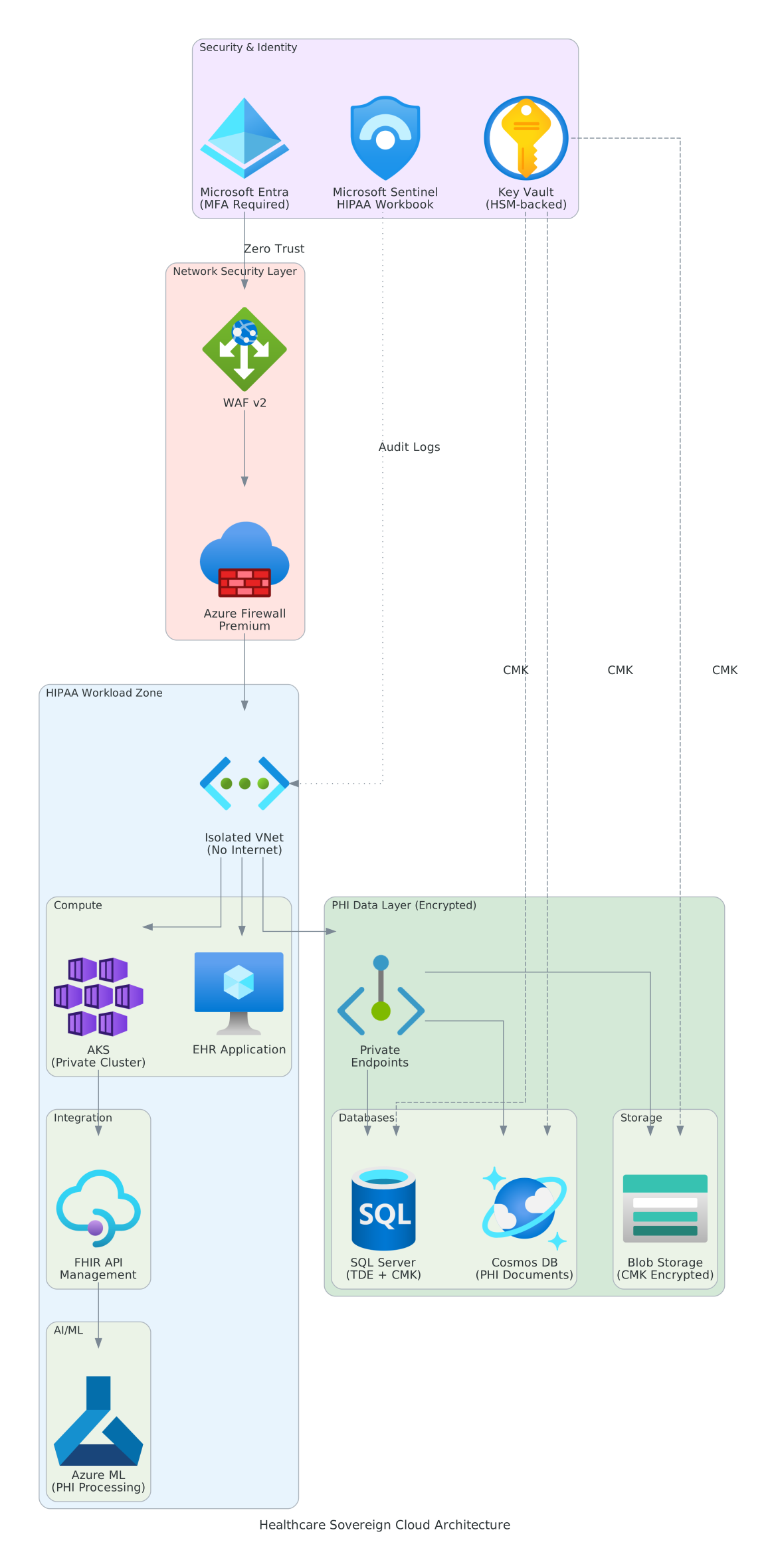 Figure 1: HIPAA-compliant architecture with PHI protection and AI/ML capabilities
Key Components
Security & Identity Layer
| Component | Purpose | Configuration |
|---|---|---|
| Microsoft Entra ID | Identity provider | MFA required for all users |
| Conditional Access | Risk-based access | Block access from non-approved locations |
| Microsoft Sentinel | Security monitoring | HIPAA compliance workbook enabled |
| Key Vault (HSM) | Key management | FIPS 140-2 Level 3 HSM |
Network Security
- Web Application Firewall (WAF) v2 — OWASP protection for patient portals
- Azure Firewall Premium — Deep packet inspection, TLS termination
- Private VNet — No direct internet access to PHI systems
Data Protection
- SQL Server with TDE + CMK — Customer-managed encryption keys
- Cosmos DB with encryption — PHI document storage
- Blob Storage with CMK — Medical imaging and files
HIPAA Safeguards Implementation
Administrative Safeguards
| Requirement | Implementation |
|---|---|
| Security Officer | Designated in Entra ID with PIM |
| Risk Assessment | Microsoft Defender for Cloud |
| Workforce Training | Tracked via Azure AD app |
| Contingency Plan | Azure Backup + Site Recovery |
Technical Safeguards
| Requirement | Implementation |
|---|---|
| Access Control | Entra ID + Conditional Access |
| Audit Controls | Log Analytics + Sentinel |
| Integrity Controls | Blob immutability + TDE |
| Transmission Security | TLS 1.3 + Private Endpoints |
Physical Safeguards
| Requirement | Implementation |
|---|---|
| Facility Access | Azure datacenter controls (SOC 2) |
| Workstation Security | Intune MDM policies |
| Device Controls | Azure AD device compliance |
FHIR API Integration
For interoperability with healthcare systems:
# Azure API for FHIR configuration
apiConfiguration:
  kind: "fhir-R4"
  accessPolicies:
    - objectId: "{EHR-App-ObjectId}"
      permissions: ["read", "write"]
  exportConfiguration:
    storageAccountName: "phiexportstorage"
    containerName: "fhir-exports"

  security:
    enableSmartProxy: true
    authority: "https://login.microsoftonline.com/{tenant-id}"
    audience: "https://{workspace}.fhir.azurehealthcareapis.com"
Clinical AI/ML Workloads
Azure Machine Learning Configuration
# Deploy private Azure ML workspace for PHI processing
New-AzMLWorkspace `
    -Name "clinical-ml-workspace" `
    -ResourceGroupName "healthcare-ai-rg" `
    -Location "westeurope" `
    -KeyVault "/subscriptions/{sub}/resourceGroups/keys-rg/providers/Microsoft.KeyVault/vaults/phi-keyvault" `
    -StorageAccount "/subscriptions/{sub}/resourceGroups/healthcare-rg/providers/Microsoft.Storage/storageAccounts/phimlstorage" `
    -PublicNetworkAccess "Disabled"
PHI Processing Guidelines
⚠️ PHI in AI/ML Workloads All machine learning models trained on PHI must be:
- Trained within approved regions
- Logged for audit purposes
- Tested for bias and fairness
- Subject to model governance review
Implementation Checklist
- BAA signed with Microsoft
- Deploy isolated VNet with no internet egress
- Configure Azure Firewall Premium
- Enable Key Vault with HSM
- Deploy SQL with TDE + CMK
- Configure Microsoft Sentinel HIPAA workbook
- Implement break-glass procedures
- Configure Azure Backup with encryption
- Deploy Azure API for FHIR
- Enable Defender for Cloud HIPAA benchmark
Next Steps
- Financial Services Architecture → — PCI-DSS compliance
- Government Cloud Pattern → — FedRAMP High implementation
Reference: Azure HIPAA/HITRUST Blueprint — Microsoft Learn