Cloud Computing Primer
Table of contents
- Overview
- What is Cloud Computing?
- Traditional IT vs. Cloud Computing
- Virtualization: The Foundation of Cloud
- Business Benefits of Cloud Computing
- Cloud Computing Challenges
- Real-World Applications
- Getting Started
- Summary
- Next Steps
- Additional Resources
Overview
Cloud computing has revolutionized how organizations consume and manage technology resources. Understanding core cloud concepts is essential for anyone working with modern digital solutions, especially in contexts requiring sovereignty and security controls.
What is Cloud Computing?
Cloud computing is the delivery of computing services—including servers, storage, databases, networking, software, analytics, and intelligence—over the internet (“the cloud”) to offer faster innovation, flexible resources, and economies of scale.
View Diagram: Five Essential Cloud Characteristics (NIST)
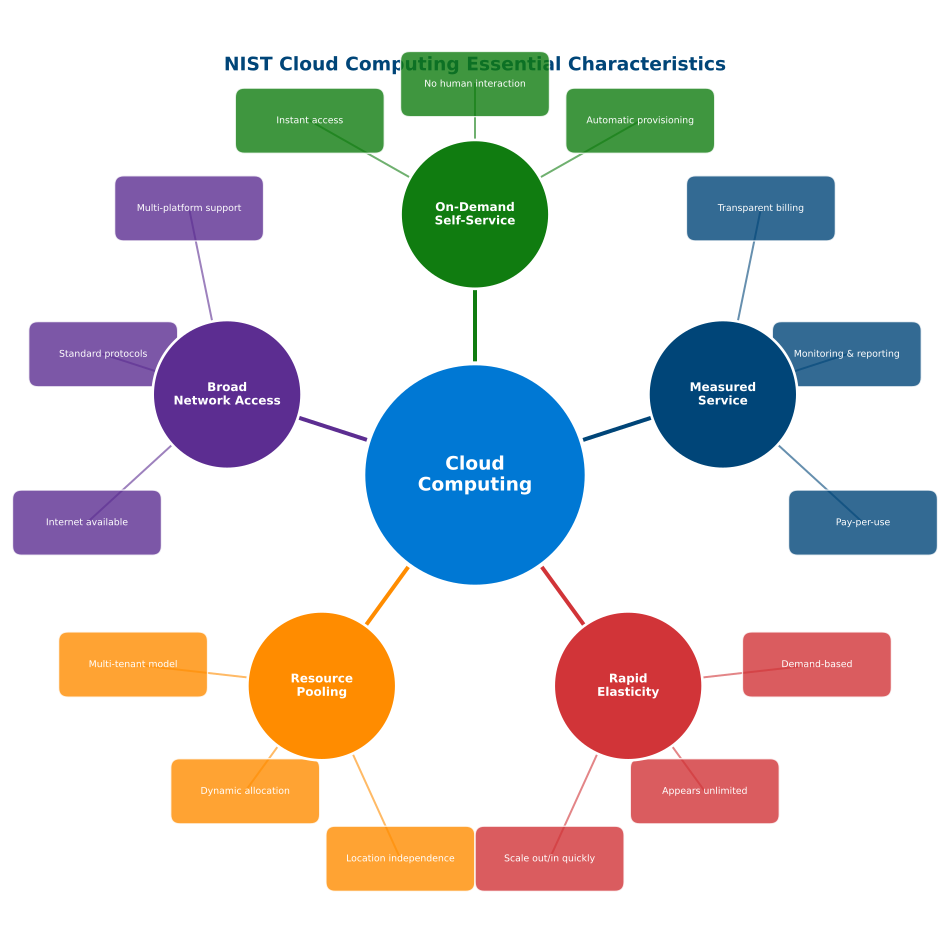 Figure: The five essential characteristics of cloud computing as defined by NIST SP 800-145
Key Characteristics
On-Demand Self-Service
- Users can provision computing capabilities automatically
- No human interaction with service providers required
- Instant access to resources when needed
Broad Network Access
- Services available over the network
- Accessible via standard mechanisms
- Supports heterogeneous platforms (mobile, tablets, laptops, workstations)
Resource Pooling
- Provider’s resources are pooled to serve multiple consumers
- Multi-tenant model with different resources dynamically assigned
- Location independence with abstraction of physical resources
Rapid Elasticity
- Capabilities can be elastically provisioned and released
- Scales rapidly outward and inward commensurate with demand
- Resources appear unlimited to consumers
Measured Service
- Cloud systems automatically control and optimize resource use
- Monitoring, controlling, and reporting provide transparency
- Pay-per-use model based on actual consumption
Traditional IT vs. Cloud Computing
View Diagram: Traditional IT vs Cloud Computing
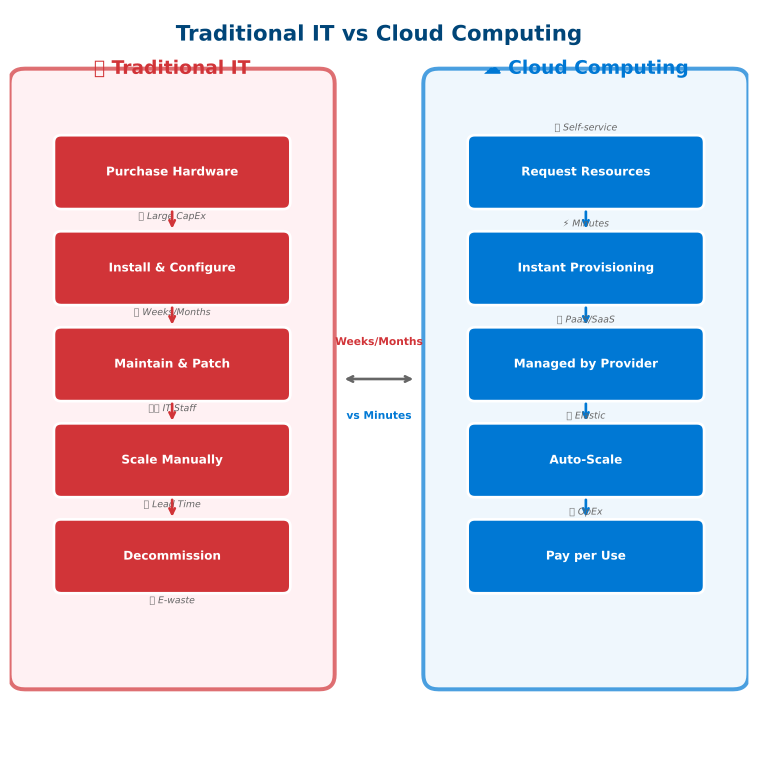 Figure: Traditional IT requires weeks/months for provisioning while cloud enables instant deployment
Traditional On-Premises Model
Capital Expenditure (CapEx)
- Large upfront investments in hardware and software
- 3-5 year refresh cycles
- Fixed costs regardless of utilization
Resource Management
- Over-provisioning to handle peak loads
- Underutilized resources during low demand
- Manual scaling processes
Operational Overhead
- Physical maintenance and support
- In-house expertise requirements
- 24/7 monitoring and management
Geographic Limitations
- Single location dependency
- Disaster recovery complexity
- Limited global reach
Cloud Computing Model
Operational Expenditure (OpEx)
- Pay-as-you-consume model
- No upfront capital investments
- Variable costs based on actual usage
View Diagram: CapEx vs OpEx Comparison
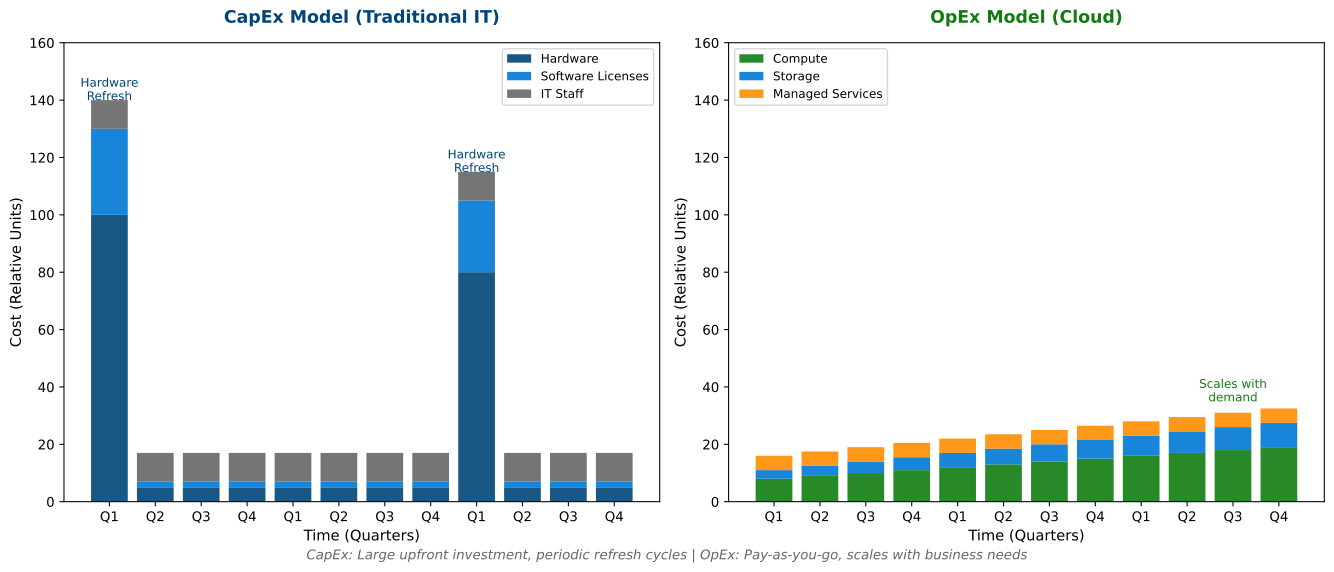 Figure: Capital Expenditure (CapEx) vs Operational Expenditure (OpEx) cost models over time
Virtualization: The Foundation of Cloud
Cloud computing is built on virtualization technology. Understanding hypervisors and virtual machines is essential for grasping how cloud resources work.
View Diagram: Hypervisor Types
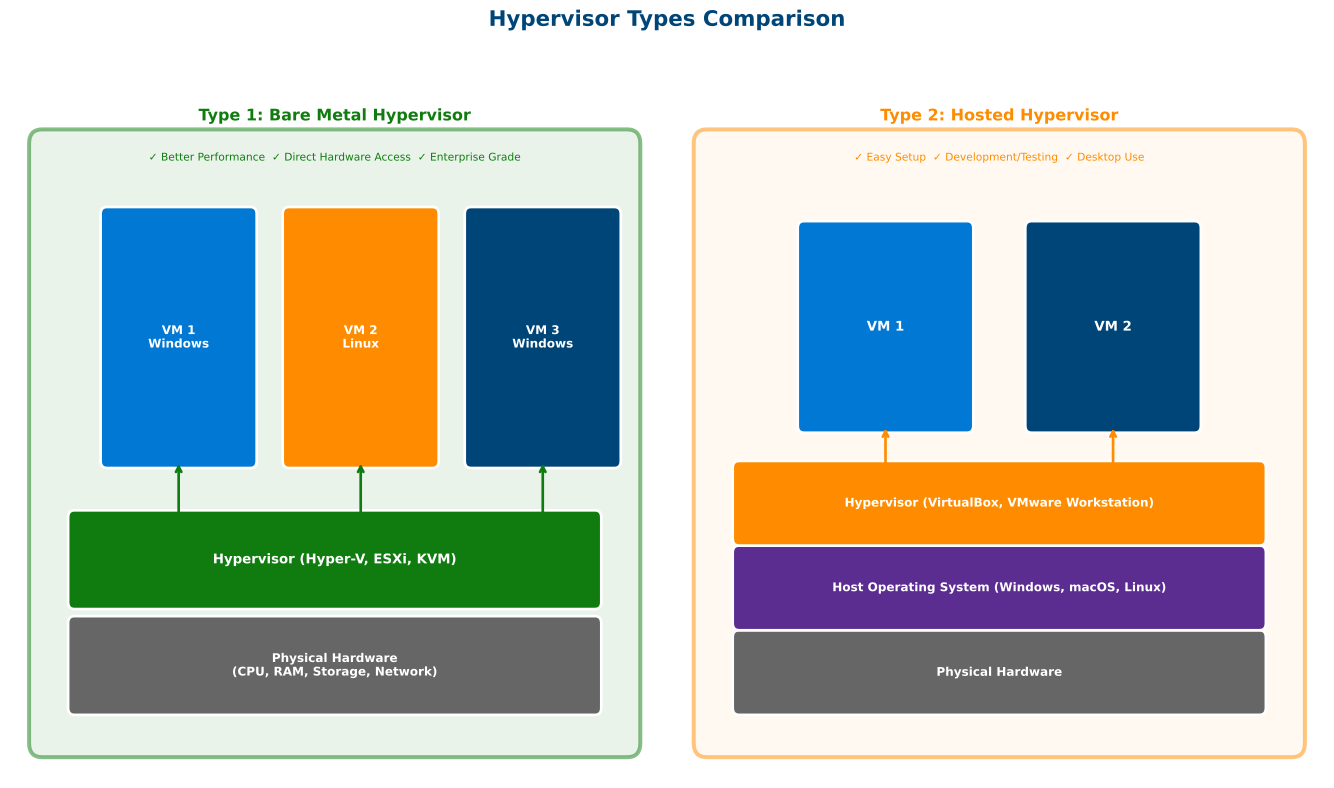 Figure: Type 1 (bare-metal) hypervisors run directly on hardware for better performance; Type 2 (hosted) run on top of an OS for development/testing
Type 1 (Bare-Metal) Hypervisors - Used in cloud data centers:
- Microsoft Hyper-V, VMware ESXi, KVM
- Direct hardware access for best performance
- Powers Azure, AWS, GCP infrastructure
Type 2 (Hosted) Hypervisors - Used for development/testing:
- VirtualBox, VMware Workstation, Parallels
- Runs on top of a host operating system
- Good for local development environments
Dynamic Resource Management
- Elastic scaling based on demand
- Optimal resource utilization
- Automated provisioning and de-provisioning
Managed Services
- Provider handles infrastructure maintenance
- Built-in security and compliance
- Professional-grade operations
Global Scale
- Worldwide data center presence
- Built-in disaster recovery
- Global content delivery
Business Benefits of Cloud Computing
Cost Optimization
Reduced Capital Expenditure
Traditional: $100K server purchase
Cloud: $500/month when needed (60% savings over 3 years)
Operational Efficiency
- Eliminate hardware maintenance costs
- Reduce IT staffing requirements
- Automated backup and recovery
Agility and Speed
Faster Time to Market
- Deploy applications in minutes, not months
- Rapid prototyping and testing
- Quick scaling for business growth
Innovation Enablement
- Access to latest technologies
- Experimentation with low risk
- Focus on business value, not infrastructure
Scalability and Performance
Elastic Scaling
Peak Season: 10x normal traffic
Cloud Response: Automatic scaling
Result: Consistent performance
Global Reach
- Deploy worldwide in minutes
- Content delivery optimization
- Reduced latency for users
Security and Compliance
Professional-Grade Security
- Dedicated security teams
- Advanced threat detection
- Regular security updates
Compliance Certifications
- SOC 2, ISO 27001, FedRAMP
- Industry-specific compliance (HIPAA, PCI DSS)
- Audit-ready documentation
Cloud Computing Challenges
Data Control and Sovereignty
Data Location
- Understanding where data is stored
- Compliance with local regulations
- Cross-border data transfer restrictions
Access Control
- Who has access to your data
- Administrative privileges
- Audit and monitoring capabilities
Connectivity Dependencies
- Internet reliability for business continuity
- Bandwidth and network performance requirements
- Hybrid connectivity with on-premises systems
Skills and Culture
- New skills needed: Cloud architecture, DevOps, automation
- Cultural shift: CapEx to OpEx mindset, new processes
Real-World Applications
Startup: Launch globally without infrastructure investment, scale on demand Enterprise: Migrate legacy apps, enable collaboration, leverage analytics Healthcare: Secure patient records, remote consultations, AI diagnostics
Getting Started
Key Assessment Areas
Current State: IT pain points, infrastructure age, scalability needs Business: Growth plans, geographic expansion, compliance requirements Risk: Data location requirements, change management capacity
Migration Approach
- Educate and plan: Assess landscape, identify cloud-ready apps
- Pilot: Start with non-critical apps, validate security/compliance
- Gradual migration: Move systematically, optimize, implement governance
Summary
Cloud computing represents a fundamental shift in how organizations consume technology. By understanding these core concepts, you’re prepared to explore more advanced topics including:
- Service Models (IaaS, PaaS, SaaS)
- Deployment Models (Public, Private, Hybrid)
- Security and Compliance considerations
- Microsoft Azure platform specifics
Next Steps
- ✅ Review cloud characteristics and benefits
- ✅ Consider how cloud computing applies to your organization
- ✅ Continue to Cloud Service Models
- ✅ Complete the Knowledge Check
Additional Resources
- NIST Definition of Cloud Computing
- Cloud Computing Benefits - Microsoft
- What is Cloud Computing? - AWS
Last Updated: November 2025