Zero Trust Implementation Architecture
Overview
This page provides a detailed technical architecture for implementing Zero Trust in sovereign cloud environments. It covers the components, data flows, decision points, and how all six pillars work together end-to-end.
View Diagram: Zero Trust Architecture for Sovereign Cloud
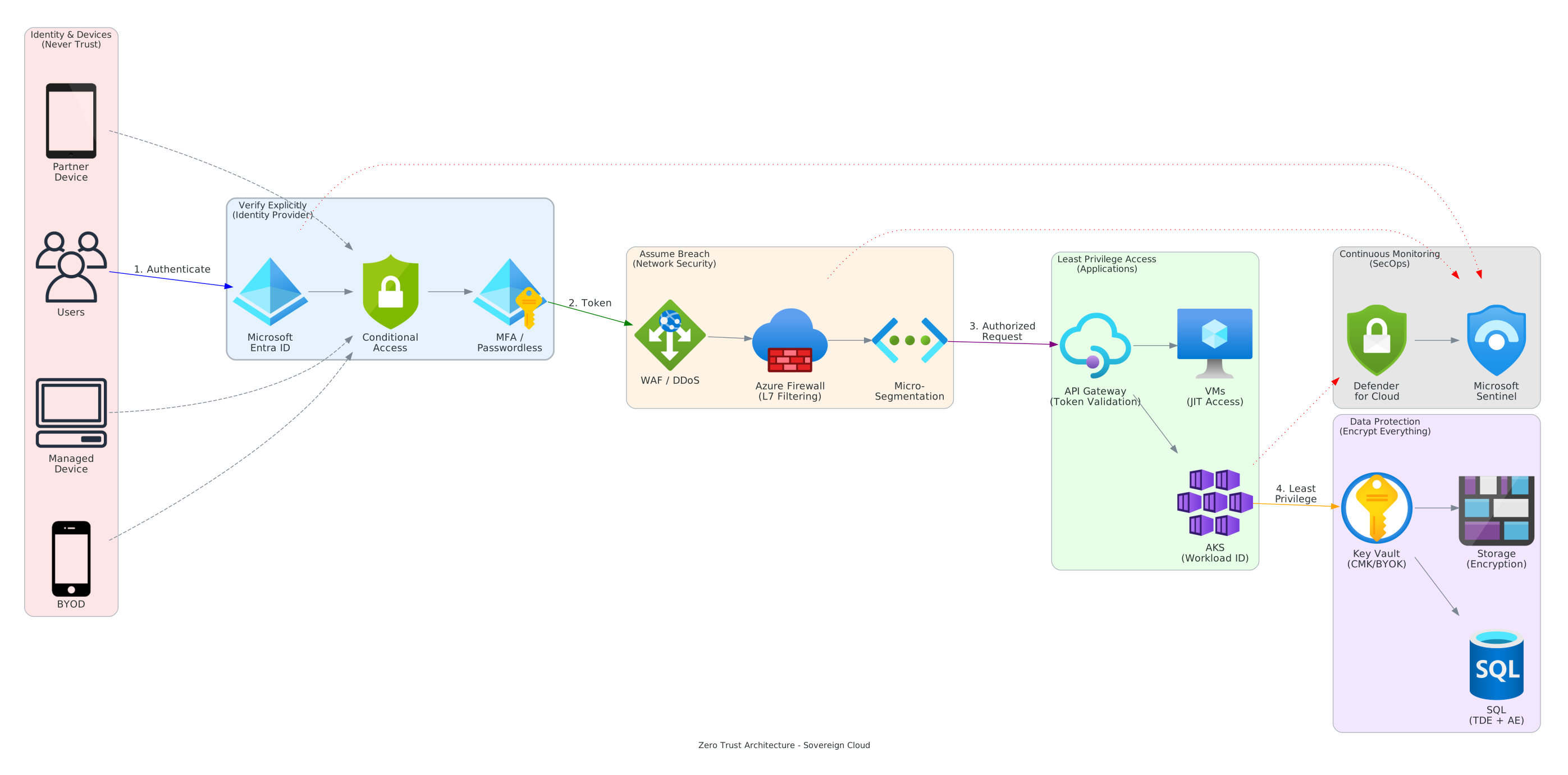 Figure 1: Complete Zero Trust implementation architecture with all security pillars and continuous monitoring
Complete Zero Trust Architecture
graph TB
    User[User/Device Entry] --> Identity[Identity Verification<br/>Entra ID / AD]
    Identity --> Device[Device Compliance Check]
    Device --> Network[Network Security]
    Network --> App[Application Access]
    App --> Data[Data Access]

    Identity -.-> IAM[• MFA<br/>• Conditional Access<br/>• Risk Assessment]
    Device -.-> Compliance[• OS Version<br/>• Encryption<br/>• Antimalware<br/>• Firewall]
    Network -.-> NetSec[• Microsegmentation<br/>• VPN/SD-WAN<br/>• Private Endpoints<br/>• Monitoring]
    App -.-> AppSec[• RBAC/ABAC<br/>• API Auth<br/>• Rate Limiting<br/>• WAF]
    Data -.-> DataSec[• Classification<br/>• Encryption<br/>• DLP<br/>• Audit Logging]

    Data --> Infrastructure[Infrastructure Security]
    Infrastructure -.-> InfraSec[• VM Hardening<br/>• NSG<br/>• Container Security<br/>• PAM]

    subgraph Monitor[Continuous Monitoring]
        SIEM[SIEM/SOAR]
        Threat[Threat Detection]
        Audit[Audit Logging]
    end

    Identity -.-> Monitor
    Device -.-> Monitor
    Network -.-> Monitor
    App -.-> Monitor
    Data -.-> Monitor
    Infrastructure -.-> Monitor

    style User fill:#D4E9D7,stroke:#107C10,stroke-width:3px,color:#000
    style Identity fill:#E8F4FD,stroke:#0078D4,stroke-width:2px,color:#000
    style Device fill:#E8F4FD,stroke:#0078D4,stroke-width:2px,color:#000
    style Network fill:#FFF4E6,stroke:#FF8C00,stroke-width:2px,color:#000
    style App fill:#FFF4E6,stroke:#FF8C00,stroke-width:2px,color:#000
    style Data fill:#F3E8FF,stroke:#7B3FF2,stroke-width:2px,color:#000
    style Infrastructure fill:#F3E8FF,stroke:#7B3FF2,stroke-width:2px,color:#000
    style Monitor fill:#FFE6E6,stroke:#D13438,stroke-width:2px,color:#000
End-to-End Architecture Components
1. User/Device Entry Point
Initial Request:
- User initiates access request (application, resource, data)
- Device sends request with authentication credentials
- Connection establishes with identity provider
Information Collected:
- User identity (username, certificate, etc.)
- Device identifier and state
- Request context (time, location, network)
- Application being accessed
- Requested resource or action
2. Identity & Access Control Layer
Identity Provider (Entra ID, on-premises AD):
- Verifies user identity
- Checks credential validity
- Assesses user risk (impossible travel, anomalous behavior)
- Applies MFA if required
Conditional Access Rules:
- Location-based policies (geo-fencing)
- Device compliance requirements
- Risk-based policies (user/sign-in risk)
- Session-based policies (refresh requirements)
- Application-specific policies
Decision Point 1: Identity Verified?
- ✓ Yes → Proceed to Device Check
- ✗ No → Deny access, log attempt
3. Device Compliance Check
Device Health Assessment:
- Operating system version and patches
- Antimalware/antivirus status
- Disk encryption enabled (BitLocker)
- Firewall enabled and active
- MFA capability
- Device enrollment status
Compliance Policies:
- Corporate-owned devices vs. personal
- OS type (Windows, macOS, iOS, Android)
- Required security tools
- Encryption requirements
Decision Point 2: Device Compliant?
- ✓ Yes → Proceed to Network Assessment
- ✗ No → Remediation required or deny access
4. Network & Connectivity Control
Microsegmentation:
- Network divided into security zones
- Each zone has explicit policies
- Traffic between zones strictly controlled
- Least privilege network access
Secure Access Methods:
- VPN or SD-WAN requirement (zero-knowledge proof)
- Private endpoint connectivity
- Application proxy (no direct internet access)
- Encrypted tunnels for all traffic
Network Monitoring:
- Real-time traffic analysis
- Anomaly detection
- DDoS protection
- Intrusion detection/prevention
Decision Point 3: Network Connection Valid?
- ✓ Yes → Proceed to Application Access
- ✗ No → Block, alert, investigate
5. Application & API Security
Application-Level Controls:
- API authentication (API keys, OAuth tokens)
- Rate limiting per user/application
- Input validation and sanitization
- DDoS protection
- Web application firewall (WAF)
Authorization:
- Role-based access control (RBAC)
- Attribute-based access control (ABAC)
- Fine-grained permissions
- Time-based access windows
Decision Point 4: Application Access Authorized?
- ✓ Yes → Proceed to Data Access
- ✗ No → Deny, log, alert
6. Data Access & Protection
Data Classification:
- Public, Internal, Confidential, Restricted
- Tags applied at storage level
- Inheritance rules for derived data
- Classification drives protection level
Access Controls:
- Encryption key tied to identity
- Audit logging of all access
- Data loss prevention (DLP) scanning
- Tokenization for sensitive data
Monitoring & Logging:
- Who accessed what data
- When and from where
- What action (read, modify, delete)
- Audit trail retention (6-7 years for compliance)
7. Infrastructure & Container Security
Infrastructure Controls:
- Virtual machine hardening
- Network security groups (NSG)
- Managed identity for services
- Privilege access management (PAM)
Container Security:
- Container image scanning
- Runtime security monitoring
- Pod security policies
- Network policies in Kubernetes
Decision Point 5: Infrastructure Access Valid?
- ✓ Yes → Grant access, establish session
- ✗ No → Deny, alert, investigate
8. Continuous Monitoring & Response
Monitoring Systems:
- Session monitoring
- Activity baseline establishment
- Anomaly detection (ML-based)
- Compliance audit logging
Real-Time Analysis:
- User behavior analytics (UBA)
- Entity behavior analytics (EBA)
- Impossible travel detection
- Suspicious activity alerts
Automated Response:
- Risk-based access adjustments
- Session termination on high risk
- Additional MFA challenges
- Escalation to security team
Feedback Loop:
- Monitoring data feeds back to conditional access
- Risk assessments updated in real-time
- Policies adjusted based on patterns
- False positive reduction
Decision Flow Summary
1. User initiates request
   ↓
2. Identity verification
   ├─ ✗ → DENY
   └─ ✓ → Continue
   ↓
3. Device compliance check
   ├─ ✗ → REMEDIATE or DENY
   └─ ✓ → Continue
   ↓
4. Network access validation
   ├─ ✗ → DENY
   └─ ✓ → Continue
   ↓
5. Application authorization
   ├─ ✗ → DENY
   └─ ✓ → Continue
   ↓
6. Data access control
   ├─ ✗ → DENY
   └─ ✓ → Continue
   ↓
7. Infrastructure access
   ├─ ✗ → DENY
   └─ ✓ → GRANT (limited session)
   ↓
8. Continuous monitoring
   ├─ Anomaly detected → CHALLENGE or REVOKE
   └─ Normal activity → Allow, Log
Defense-in-Depth Layering
Layered Defense Example:
Layer 1 - Perimeter: Network firewalls, DDoS protection, intrusion detection
Layer 2 - Access: MFA, Conditional Access, device compliance
Layer 3 - Application: API security, rate limiting, WAF
Layer 4 - Data: Encryption, classification, audit logging
Layer 5 - Infrastructure: VM hardening, network policies, PAM
Layer 6 - Core: Protected resources, encryption keys, sensitive data
If any layer is breached, others still provide protection.
Compliance Mapping
Implementation Patterns
Pattern 1: Centralized Identity (Standard)
Topology:
- Central identity provider (Entra ID, on-premises AD)
- All access decisions routed through central system
- Works for connected environments
- Single point of management
Pros:
- Centralized policy management
- Consistent access decisions
- Easier compliance auditing
Cons:
- Dependent on central system availability
- Not suitable for air-gapped environments
- Network latency for remote sites
Pattern 2: Distributed Identity (Sovereign/Edge)
Topology:
- Local identity caches at each site
- Local policy enforcement
- Periodic sync with central
- Works in disconnected mode
Pros:
- Works without cloud connectivity
- Faster local decisions
- Suitable for air-gapped environments
- Data residency compliance
Cons:
- Policy sync complexity
- Potential for policy drift
- More operational overhead
Pattern 3: Hybrid (Recommended for Sovereign)
Topology:
- Central policy management
- Local enforcement engines
- Event log synchronization
- Periodic reconciliation
Pros:
- Best of both: central control + local enforcement
- Works connected or disconnected
- Suitable for sovereign requirements
- Flexibility and resilience
Cons:
- More complex implementation
- Requires local caching/replication
- More operational procedures
Sovereign Cloud Considerations
Data Residency
- All policy decisions made within sovereign boundary
- No policy data leaves jurisdiction
- Audit logs stored locally
- Encryption keys held locally
Customer Control
- Customer defines all policies
- Customer reviews access logs
- No Microsoft infrastructure in policy path
- Explicit approval workflows possible
Compliance Requirements
- FedRAMP: Continuous monitoring, explicit controls, audit logging
- GDPR: Data subject rights, DPA review, encryption
- HIPAA: Role-based access, audit controls, de-identification
- ITAR: U.S. person verification, controlled data access
Air-Gap Capability
- Local identity verification
- Local policy enforcement
- Offline access (limited scenarios)
- Manual sync procedures
Next Steps
- Continue to Monitoring & Compliance →
- Ready for hands-on work? Lab: Implement Zero Trust →
Last Updated: October 2025