Sovereign Landing Zone Architecture
Complete enterprise reference architecture for deploying sovereign cloud infrastructure with full compliance and governance controls.
Table of Contents
- Table of Contents
- Overview
- Learning Objectives
- Prerequisites
- Sovereign Landing Zone Components
- Multi-Region Deployment
- Hybrid Identity Architecture
- Implementation Checklist
- Next Steps
Overview
A Sovereign Landing Zone provides a standardized, secure foundation for deploying workloads that must comply with data residency, regulatory, and operational sovereignty requirements. This architecture implements Azure’s Cloud Adoption Framework principles with sovereignty-specific enhancements.
Learning Objectives
After completing this section, you will be able to:
- ✅ Design a complete sovereign landing zone architecture
- ✅ Implement management group hierarchy for governance
- ✅ Configure network topology for sovereignty requirements
- ✅ Apply policy-as-code for compliance enforcement
Prerequisites
- Completed Level 200 modules
- Understanding of Azure management groups and subscriptions
- Familiarity with Azure Policy and governance concepts
Sovereign Landing Zone Components
View Diagram: Sovereign Landing Zone Architecture
_ Sovereign Landing Zone Architecture Figure 1: Complete sovereign landing zone with management group hierarchy, network topology, and security controls
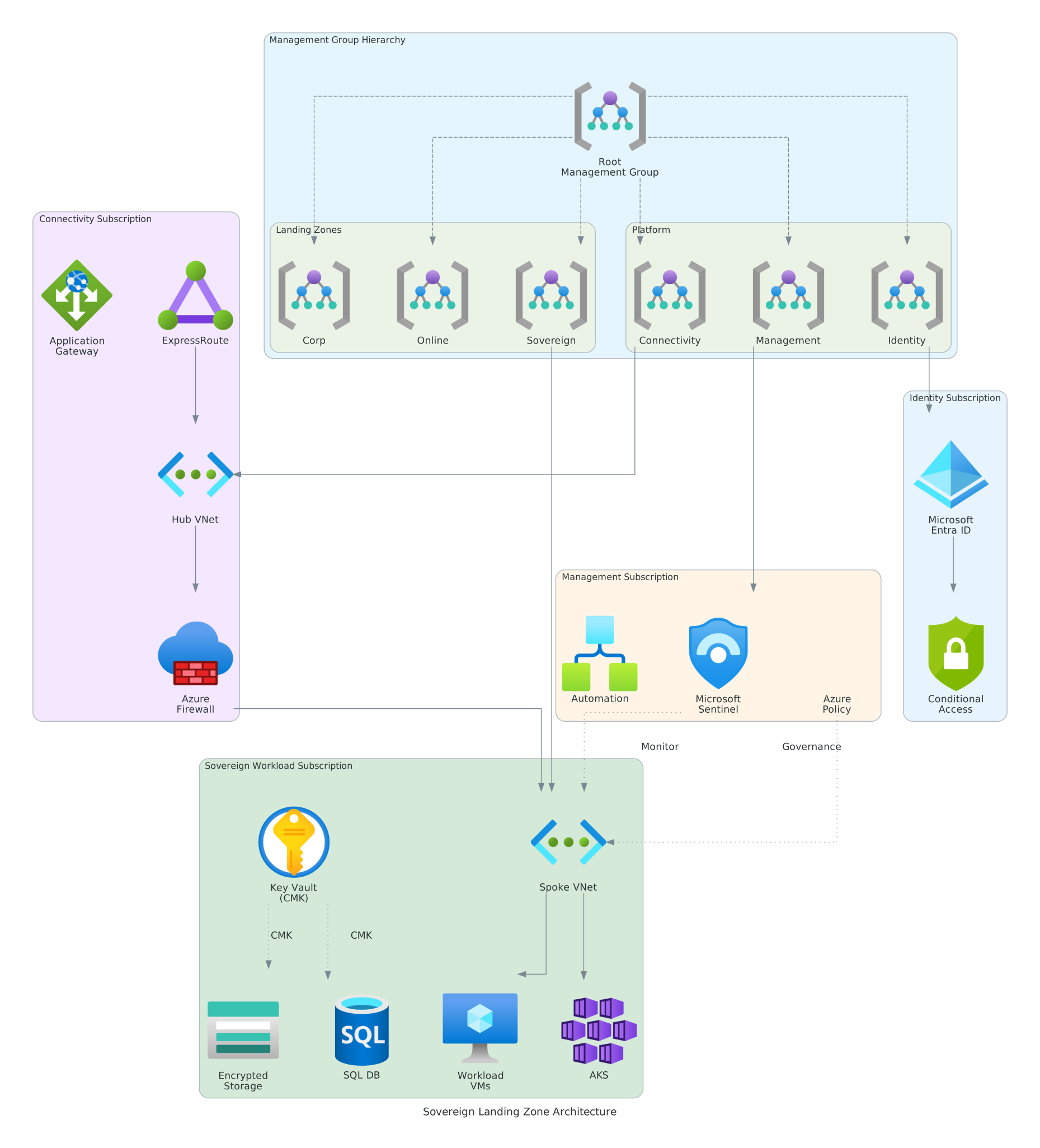
Management Group Hierarchy
The sovereign landing zone uses a hierarchical management group structure:
| Level | Purpose | Example |
|---|---|---|
| Root | Tenant-wide governance | Contoso Root |
| Platform | Central IT services | Platform MG |
| Landing Zones | Workload subscriptions | EU Landing Zones |
| Sandbox | Development/testing | Dev/Test MG |
Core Components
1. Identity & Access
- Microsoft Entra ID — Centralized identity with conditional access
- Privileged Identity Management (PIM) — Just-in-time access
- Customer Lockbox — Operator access approval
2. Network Topology
- Hub-Spoke Architecture — Centralized connectivity
- Azure Firewall — Egress filtering and threat protection
- ExpressRoute — Private connectivity to on-premises
- Private Endpoints — PaaS service isolation
3. Security & Compliance
- Azure Policy — Guardrails and compliance automation
- Microsoft Defender for Cloud — Security posture management
- Key Vault with HSM — Centralized secrets and key management
- Log Analytics — Centralized logging and monitoring
Multi-Region Deployment
For organizations requiring geographic redundancy within sovereignty boundaries:
View Diagram: Multi-Region Sovereign Deployment
_ Multi-Region Sovereign Deployment Figure 2: Multi-region deployment with data residency controls and cross-region replication
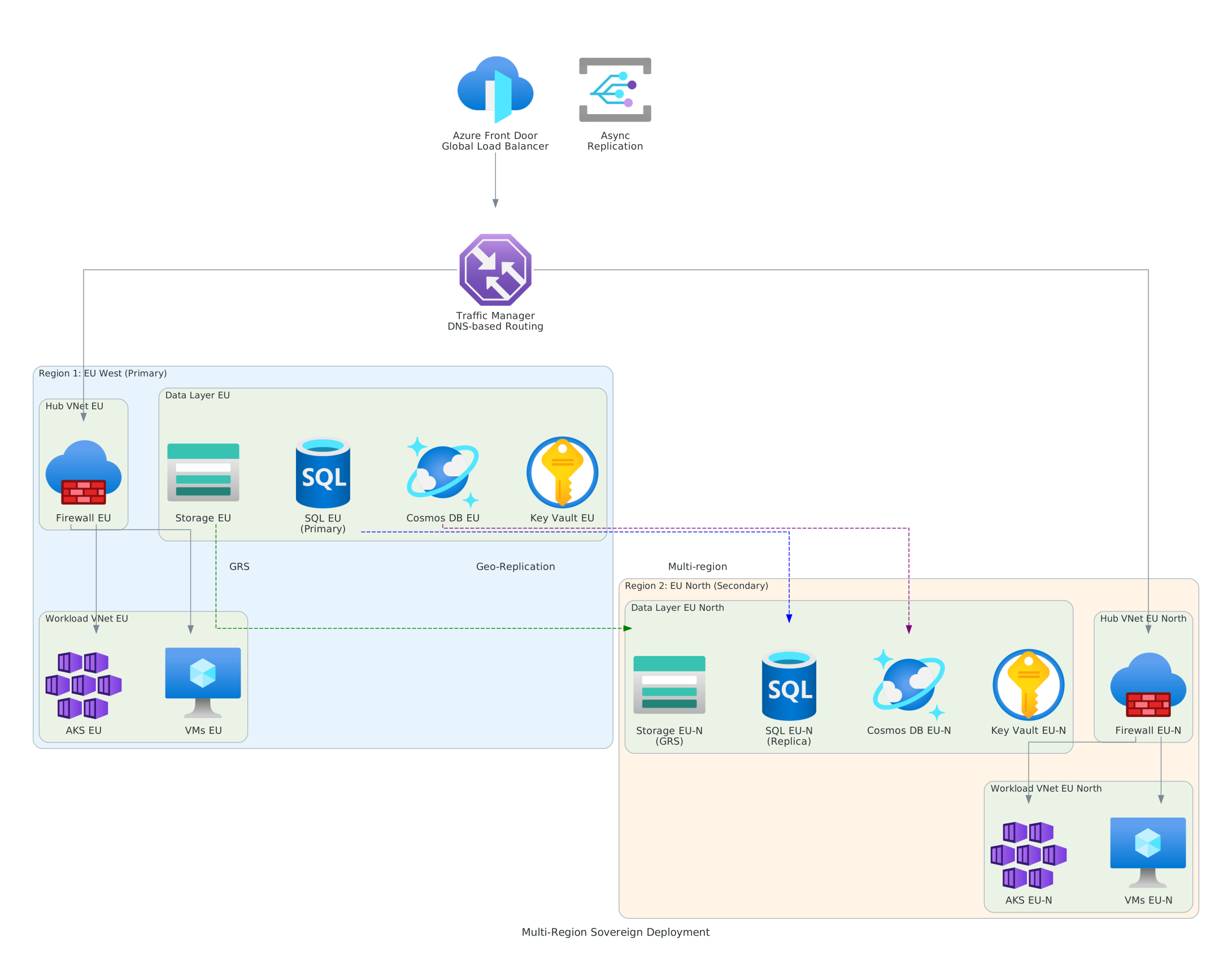
Region Selection Criteria
When selecting Azure regions for sovereign deployments:
- Data Residency — Regions within sovereignty boundary
- Compliance Certifications — Required regulatory approvals
- Service Availability — Needed Azure services present
- Latency Requirements — Performance for end users
Hybrid Identity Architecture
Organizations with on-premises Active Directory require hybrid identity integration:
View Diagram: Hybrid Identity Architecture
_ [Hybrid Identity Architecture](../assets/images/level-300/hybrid-identity.svg Figure 3: Hybrid identity with Microsoft Entra Connect and conditional access
Identity Synchronization Options
| Option | Use Case | Sovereignty Impact |
|---|---|---|
| Password Hash Sync | Cloud-first | Hashes stored in cloud |
| Pass-through Auth | On-premises control | No password data in cloud |
| Federation (AD FS) | Full on-premises | Complete identity sovereignty |
Implementation Checklist
- Define management group hierarchy
- Create platform subscriptions (connectivity, identity, management)
- Deploy hub virtual network with Azure Firewall
- Configure ExpressRoute or VPN connectivity
- Implement Azure Policy initiatives
- Enable Microsoft Defender for Cloud
- Deploy Log Analytics workspace
- Configure Microsoft Entra ID with PIM
Next Steps
- Data Classification Flow → — Classify and protect sensitive data
- Incident Response Workflow → — Security incident procedures
- Industry Architectures → — Industry-specific implementations
Reference: Azure Landing Zones — Microsoft Cloud Adoption Framework